Customer onboarding toolkit
NEW CLIENT ONBOARDING

By
Sammy Jones
The Ultimate Guide to Self-Service Onboarding in SaaS
In SaaS, the customer onboarding process decides your fate faster than pricing or features.
Users rarely churn because they dislike your product. They churn because they never reach value. Studies show that poor user onboarding experience drives early churn as high as 60–90% in the first 90 days, with poor onboarding contributing to up to 68% of SaaS customer churn overall.
Self-service onboarding, also called self-serve onboarding, promises a scalable fix: let new users onboard at their own pace, reduce costs, and accelerate product adoption.
For some SaaS companies, it becomes a powerful growth engine. Companies using automated onboarding workflows can reduce churn by 25%.
For others, it turns into a silent churn machine, with 75% of users abandoning products in the first week if they struggle to get started.
The difference isn’t the automation itself. Its alignment and expectation.
When your self-service onboarding process delivers exactly what product marketing promised, new customers feel the value of your product quickly. When it doesn’t, trial users drop off before customer success teams even notice.
This ultimate guide to self-service onboarding explores when self-serve customer onboarding works brilliantly and when it backfires.
Related Blog: Augmented Reality (AR) in Client Onboarding Experience 2025
Why Traditional Customer Onboarding Fails in SaaS
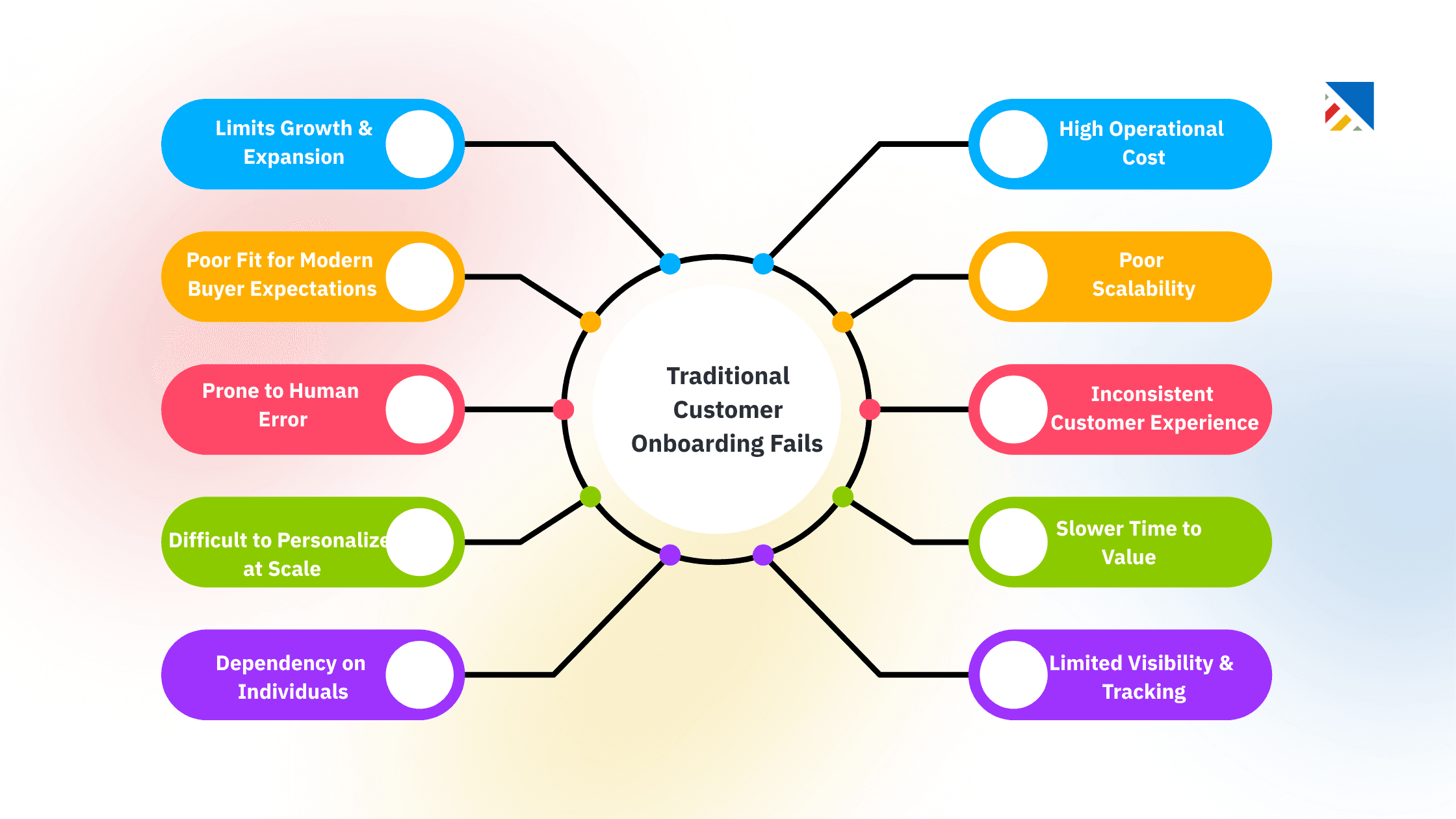
High Operational Cost: Traditional onboarding relies heavily on manual effort, like kickoff calls, emails, custom setups, and constant follow-ups. As customer volume grows, this model becomes expensive and difficult to scale.
Poor Scalability: Each new customer requires human involvement. Teams quickly hit capacity limits, leading to delays, rushed onboarding, or inconsistent experiences during growth phases.
Inconsistent Customer Experience: Different CSMs or implementation managers deliver onboarding in different ways. This lack of standardization creates uneven quality and unpredictable time-to-value.
Slower Time to Value (TTV): Manual coordination, scheduling dependencies, and back-and-forth communication slow down activation. Customers often wait days or weeks before seeing real product value.
Limited Visibility & Tracking: Progress is often tracked in spreadsheets, emails, or internal tools. Customers and leaders lack real-time visibility into onboarding status, risks, or blockers.
Dependency on Individuals: Success depends on specific team members’ knowledge and availability. If someone is overloaded or leaves, onboarding quality suffers immediately.
Difficult to Personalize at Scale: While onboarding may feel “high-touch,” it’s hard to personalize consistently across many customers without adding more headcount or complexity.
Prone to Human Error: Manual task assignment, data entry, and follow-ups increase the risk of missed steps, miscommunication, and delays, especially across cross-functional teams.
Poor Fit for Modern Buyer Expectations: Today’s buyers expect speed, transparency, and self-service options. Traditional onboarding often feels slow, opaque, and outdated by comparison.
Limits Growth & Expansion: When onboarding consumes too much time and effort, teams spend less energy on adoption, expansion, and long-term customer success—directly impacting retention and NRR.
What is Self-Service Onboarding?
Self-serve onboarding is an automated onboarding experience where new users set up and begin using your SaaS product independently, without requiring direct human intervention.
It relies on in-app guidance such as product tours, interactive walkthroughs, onboarding checklists, tooltips, tutorials, and self-help resources like a knowledge base, help center, and documentation to guide users to value.
It forms the core of product-led onboarding, where the product itself helps users complete the onboarding journey and reach time to value fast. The most effective self-serve onboarding processes use progressive disclosure and personalized onboarding touches to keep momentum without overwhelm.
Successful examples include:
Notion’s empty workspace with subtle prompts and an accessible help centre
Slack’s step-by-step interactive walkthrough for teams and channels
Figma’s hands-on tutorial files with in-app product tours
These self-service customer onboarding experiences feel effortless because the products are intuitive, the stakes are low, and marketing has set clear expectations for how users can start using the product immediately.
Benefits of Self-Service Onboarding
When conditions align, self-service onboarding delivers clear advantages for SaaS businesses:
Scalability
A true scalable onboarding model that supports thousands of new customers without adding proportional customer support or customer success team resources.
Speed and Faster Time to Value
New users can begin immediately and onboard at their own pace, no scheduling demos or waiting for availability.
Lower Costs
Onboarding automation reduces early reliance on human-led sessions, lowering customer acquisition and support costs.
Stronger Product Adoption
Great in-app onboarding flows, onboarding checklists, and interactive walkthroughs guide users to the “aha” moment.
Quickly, interactive elements like product tours can boost feature adoption. Structured onboarding approaches increase retention by up to 50%.
When marketing positions the product as easy and self-serve, this reinforces trust and keeps users engaged throughout the onboarding process.
For simpler SaaS products and tech-savvy audiences, self-service onboarding is often the most efficient customer onboarding method.
When Self-Service Onboarding Backfires
Despite its promise, self-service onboarding fails for many SaaS companies, not because automation is flawed, but because the foundation isn’t designed for how users actually adopt complex products. The breakdown is almost always structural.

1. Product complexity is the first culprit. When a product has a steep learning curve, multi-step setup, or interconnected workflows, users quickly become overwhelmed without contextual guidance.
This problem is amplified when marketing positions the product as “easy” while onboarding exposes hidden complexity, creating an expectation gap that leads to early abandonment.
2. High-stakes or enterprise use cases further limit the effectiveness of pure self-service. Products that touch compliance, security, financial workflows, or revenue-critical operations require confidence and reassurance. In these scenarios, customers want validation, expert input, and accountability that automated flows alone rarely satisfy.
3. Audience diversity is another common failure point. SaaS products marketed broadly attract users with varying levels of technical skill, domain knowledge, and goals.
When onboarding isn’t segmented by role, maturity, or use case, less technical users stall, advanced users feel constrained, and both experience friction instead of momentum.
4. Onboarding flow friction compounds these issues. Too many steps before reaching the first value, cluttered modals, missing progress indicators, or generic walkthroughs that ignore real user workflows create cognitive overload. Instead of guiding users forward, onboarding becomes another obstacle to overcome.
5. Finally, lack of personalization undermines adoption. One-size-fits-all onboarding fails in modern SaaS, where users expect guidance tailored to their role, industry, goals, and data context. When onboarding doesn’t adapt, users disengage quickly.
Together, these breakdowns lead to a poor user onboarding experience, early churn, and negative feedback loops.
In fact, without optimized onboarding, the average SaaS product retains only around 39% of users after the first month, making onboarding one of the highest-leverage growth levers in SaaS.
Related Blog: 5 Best Client Onboarding Software for Consulting Firms
Self-Service vs. Assisted (Traditional) Onboarding
Aspect | Self-Service Onboarding | Traditional Onboarding |
|---|---|---|
Cost | Low and scalable | Higher due to customer success involvement |
Speed to Start | Immediate, self-serve | Scheduled calls and sessions |
Personalization | Segment-based, using analytics | High and human-tailored |
Best For | Simple, low-risk SaaS products | Complex, high-value client onboarding |
Risk of Drop-Off | Higher without polished flows | Lower with hand-holding |
Time-to-Value | Fast if intuitive | Slower start, deeper long-term adoption |
Marketing Fit | Product-led, bottom-up | Sales-led, enterprise |
Top SaaS companies blend both: default to self-serve onboarding while offering human support when analytics or behavior signals struggle.
When Self-Service Onboarding Works Best
Self-serve onboarding excels when:
The SaaS product is intuitive and focused
Time to value is minutes, not days
Marketing targets self-motivated, technical users
The model is product-led or freemium
Tools like Canva, Airtable, and Linear thrive because exploration is encouraged—and marketing reinforces that self-service learning mindset.
Risks of Pure Self-Service for Complex SaaS Products
For highly configurable or enterprise tools, forcing self-service only is risky. Users often need context, best practices, and confidence. Without escape hatches to human help, results include:
Significantly higher early churn
Downstream support overload
Reviews citing “confusing setup” despite strong features
Best Practices for Building an Effective Self-Service Onboarding Process
To create a self-service onboarding that drives adoption and reduces churn:
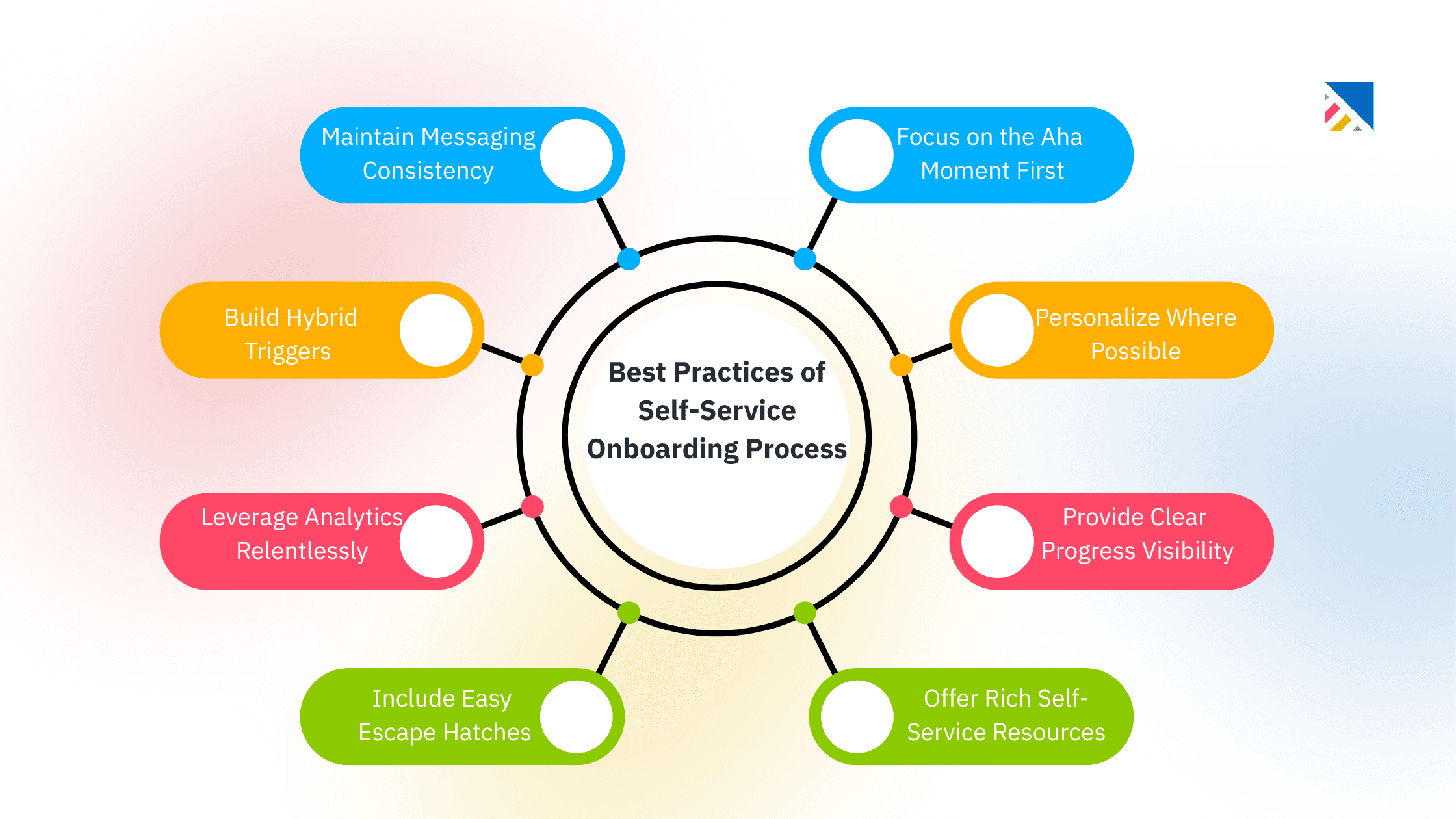
1. Focus on the Aha Moment First: Design new client onboarding to lead users directly to the core action that delivers immediate value the moment they first experience why your product matters. Use onboarding checklists, product tours, and guided setup to remove distractions and accelerate time to value instead of explaining every feature upfront.
2. Personalize Where Possible: Leverage customer data such as role, industry, use case, company size, or lifecycle stage to tailor interactive walkthroughs and content. Personalized onboarding reduces cognitive load, increases relevance, and makes users feel the product was built for their specific needs.
3. Provide Clear Progress Visibility: Milestones, progress bars, and completion checklists give users a sense of momentum and control. Clear progress indicators reduce abandonment by showing what’s done, what’s next, and how close users are to achieving their first success.
4. Offer Rich Self-Service Resources: Support onboarding with a robust help center, searchable knowledge base, contextual tooltips, and embedded tutorials. Users should be able to find answers instantly without leaving the product or waiting for support.
5. Include Easy Escape Hatches: Even the best self-service flows need a human fallback. Provide one-click access to live chat, support tickets, demos, or expert calls so users can get unstuck the moment friction appears.
6. Leverage Analytics Relentlessly: Continuously track onboarding metrics such as drop-off points, feature adoption, time to value, and qualitative feedback. Use these insights to test, refine, and optimize onboarding flows based on real user behavior not assumptions.
7. Build Hybrid Triggers: Use behavioral signals to detect when users are struggling with missed milestones, inactivity, or repeated errors and automatically offer human assistance. This hybrid approach preserves scalability while protecting high-value or at-risk users.
8. Maintain Messaging Consistency: Ensure that the language, promises, and value propositions used in marketing and sales carry seamlessly into in-app guidance. Consistent messaging reinforces trust, meets expectations, and prevents the “this isn’t what I signed up for” experience.
Following these self-service onboarding best practices helps users get the most value from your product while keeping your customer experience strong.
Related Blog: AI-Powered Customer Onboarding: How to Automate with AI
Final Thoughts: Is Self-Service Onboarding Right for Your SaaS Business?
Self-service onboarding lets new customers onboard at their own pace and scale efficiently, but only when your product, audience, and execution align with the promises you make.
For simple, intuitive SaaS products serving self-motivated users, a well-built self-serve onboarding process is a competitive advantage.
For complex tools or diverse audiences, a pure self-service approach often leads to frustration and churn.
The strongest teams ask:
Can new users reach value quickly and independently?
Do our flows match marketing claims?
Do struggling users have clear paths to help?
Audit your current customer onboarding journey against these questions today. Small alignment fixes can transform trial users into engaged, long-term customers.
Great self-service onboarding isn’t just automation; it’s about helping every new user experience the full value of your product, clearly and on their terms.
Frequently Asked Questions
1. What is self-service onboarding?
Self-service onboarding (also known as self-serve onboarding) is an automated process where new users or customers independently set up and start using a product, typically a SaaS tool, without direct human assistance. It relies on in-app guidance, interactive walkthroughs, checklists, tooltips, help centers, and knowledge bases to guide users through the onboarding journey at their own pace. This approach is core to product-led growth strategies, enabling scalability and faster time-to-value for simple, intuitive products.
2. What does self-onboarding mean?
Self-onboarding is essentially synonymous with self-service onboarding. It refers to the process where users complete onboarding tasks on their own, using self-guided resources rather than relying on customer success teams, sales reps, or live support. The term emphasizes user independence and is commonly used interchangeably in SaaS contexts to describe digital, automated experiences that empower new customers to get started quickly.
3. What exactly does self-service mean?
In business and SaaS, self-service means allowing customers or users to handle tasks, access information, and resolve issues independently, without needing to contact support or sales teams. Examples include signing up for a product, configuring settings, finding answers in a knowledge base, or upgrading plans, all through intuitive interfaces and resources. It reduces costs for companies while giving users convenience and control.
4. What are the 5 stages of the onboarding process?
In SaaS customer onboarding, a common framework breaks the process into five key stages:
Sign-up and Welcome: The user registers, receives a welcome message, and gets initial orientation.
Account Setup and Configuration: Guiding the user to complete profile setup, integrations, or basic customization.
Product Education and Training: Providing tutorials, walkthroughs, and resources to teach core features.
Achieving First Value (Aha Moment): Helping the user complete key actions that deliver immediate benefits.
Ongoing Adoption and Optimization: Supporting habit-building, advanced features, and long-term success through feedback and resources.
These stages can vary depending on product complexity, but the goal is to achieve progressive value realisation, which boosts adoption and reduces churn.
5. What are the benefits of self-service onboarding?
Self-service onboarding offers scalability (onboarding thousands without additional staff), lower costs (fewer support tickets and demos), faster time-to-value (users start immediately), and higher user satisfaction (control over the pace). It's ideal for product-led SaaS, accelerating adoption and freeing teams for high-value tasks.
6. When does self-service onboarding work best?
It excels for intuitive, low-complexity products with tech-savvy, self-motivated users who think tools like Notion, Slack, or Canva. It thrives in product-led or freemium models where quick exploration leads to value. For complex, high-stakes enterprise tools, a hybrid approach (self-service + human support) often performs better.
7. What are common challenges with self-service onboarding?
Common pitfalls include high drop-off from friction (e.g., too many steps or poor guidance), confusion for non-technical users, lack of personalization, and misaligned expectations if marketing oversells simplicity. Without analytics-driven iteration and escape hatches to human help, it can lead to frustration, low adoption, and increased early churn.
You may also like

A Guide to Project Management Professional Certification

Laugh Your Way to Productivity: 50 Workplace Quotes

50 Funny Workplace Memes That’ll Brighten Your Workday.
What Does a Customer-First Mindset Mean? Explained in 2025

What It Takes to be a Great Customer Success Manager in 2025