Digital Sales Room

By
Dhruv
CRM vs. Digital Sales Room: Why Sales Teams Need Both
Enterprise revenue leaders know this story: RevOps presents a perfectly updated CRM at QBR, yet the quarter closes at 74% of target, with missed deals no one saw coming.
The missing layer isn’t better data entry; it’s visibility. That’s where the Digital Sales Room comes in, capturing real buyer engagement alongside the CRM’s system of record.
The CRM did its job; it recorded what reps knew and entered. But it couldn’t show buyer reality: stakeholders disengaging, competitors re-entering, or champions leaving mid-cycle.
This isn’t a CRM failure; it’s a category limitation. A CRM is a system of record, not a system of buyer engagement.
In 2026, with larger buying committees and more deals happening in Digital Sales Rooms, relying on one tool costs deals. This is why modern revenue teams need both, tightly integrated to win complex, high-value accounts.
Book a Demo to See How Digital Sales Rooms Work
The Architecture of a Modern Enterprise Deal
Before mapping tools to problems, it helps to understand what enterprise buying actually looks like in 2026.
The B2B purchasing process has fractured. According to Demand Gen Report (2024), buyers are nearly 70% through their purchasing process before engaging with sellers, and 80% of the time, it’s the buyers who initiate first contact.
Similarly, 6sense’s 2024 Buyer Experience Report found that 81% of buyers have already chosen a preferred vendor before speaking to a sales rep
When buying committees do engage, it is rarely through a single champion. Procurement, legal, IT security, finance, and end users all have seats at the table, but they rarely attend the same meetings, making alignment complex and consensus harder to achieve.
This creates a visibility gap. AEs see only about 5% of the buying journey, while the other 95% happens in internal discussions that no CRM can capture.
Better CRM hygiene, pipeline reviews, and frameworks help, but don’t fix the core issue: CRMs record what sellers report, while Digital Sales Rooms capture what buyers actually do.
Take a quick walkthrough to see how it works
What a CRM Actually Does, and What It Was Never Built For
CRM software is essentially a structured database with workflows. It organizes accounts, tracks activities, and powers pipeline reporting and forecasts.
Platforms like Salesforce, HubSpot, and Microsoft Dynamics are indispensable, forming the operational spine of revenue teams. But they are seller-centric; the data reflects what reps enter, not the full buyer reality.
The Structural Blind Spots
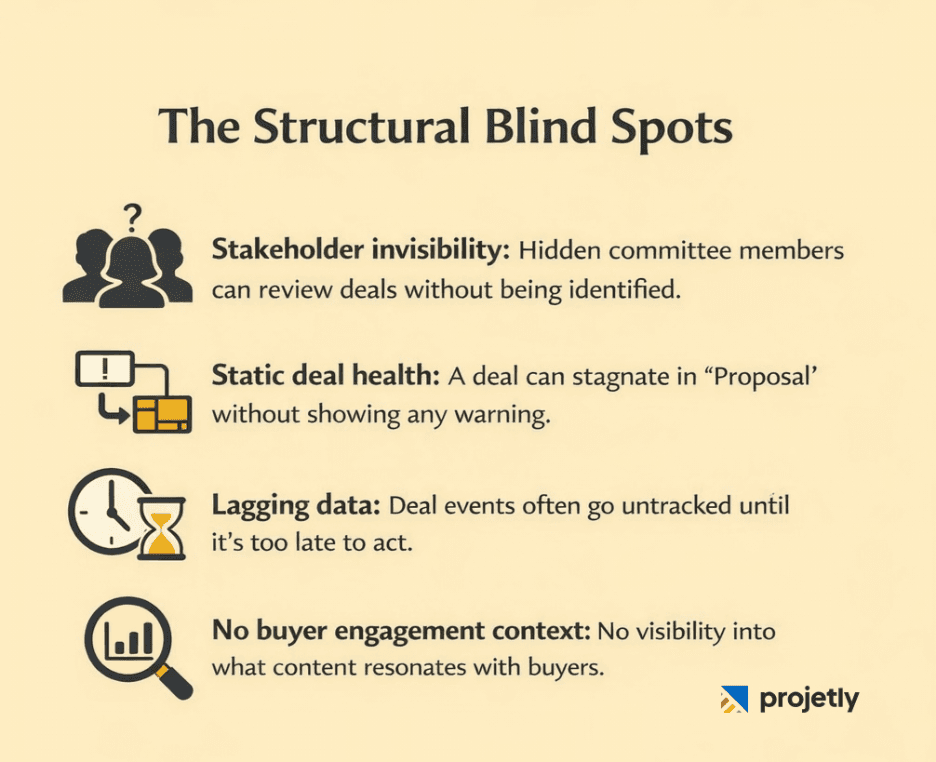
The gaps in CRM-only selling are not rare exceptions. They are structural limitations built into how CRM systems are designed.
Stakeholder invisibility: A CRM only tracks the contacts a sales rep has interacted with. It cannot surface members of the buying committee who are reviewing the deal internally but have never joined a call or email thread.
Static deal health: Pipeline stages in a CRM are only proxy indicators. A deal sitting in “Proposal” for three weeks looks the same whether the buyer is actively evaluating it or has completely disengaged.
Lagging data: Activity updates often happen days or weeks after the fact. By the time a manager notices a stalled deal during a pipeline review, the opportunity to intervene early has usually passed.
No buyer engagement context: A CRM might show that a prospect opened an email, but it cannot reveal what captured their attention, such as which slides they spent time reviewing, which case studies they shared internally, or which pricing option they revisited multiple times.
None of this is a flaw in CRM platforms. These limitations reflect intentional design decisions for systems built to manage the seller’s workflow. The problem begins when organizations treat the CRM as a complete view of deal reality, rather than just one layer of it.
Start your free trial and explore the platform
What a Sales Deal Room Actually Does
A Digital Sales Room (DSR), sometimes called a Sales Deal Room, is a secure, branded workspace created for each deal. It acts as a shared environment where the seller’s team and the buyer’s committee collaborate during the evaluation process. While a CRM manages the seller’s internal workflow, a DSR supports external collaboration, the space where both sides actually interact during the deal.
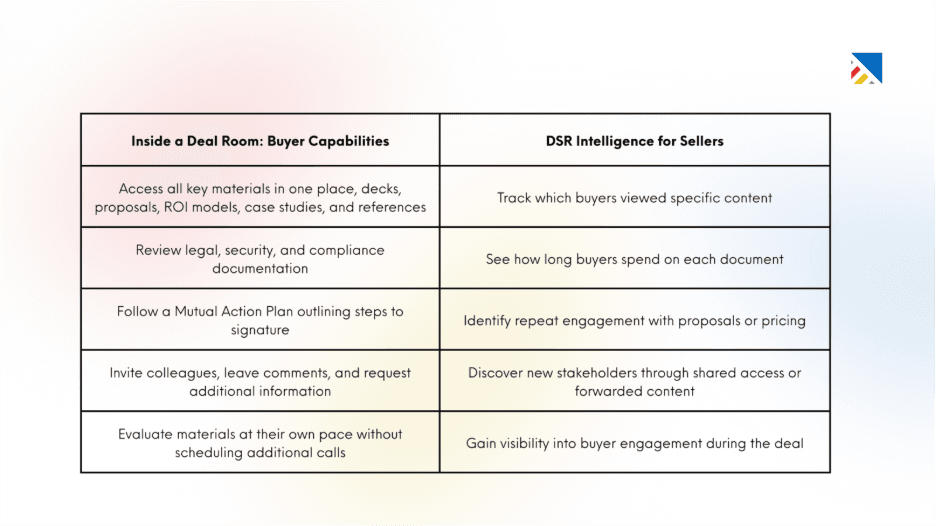
Inside a well-structured deal room, buyers can:
Access key materials in one place: decks, proposals, ROI models, case studies, and references.
Review legal, security, and compliance documentation.
Follow a Mutual Action Plan outlining steps to signature.
Invite colleagues, leave comments, and request additional information.
Evaluate content at their own pace without scheduling another call.
For sellers, the DSR provides an intelligence layer:
Track who viewed which content.
See how long buyers spent on specific materials.
Identify repeat engagement with proposals or pricing.
Discover new stakeholders through shared access or forwarded content.
This visibility reveals the 95% of buyer behavior that traditionally happens outside the sales team’s view, giving sellers a much clearer picture of deal progress.
Core Capabilities of Digital Sales Rooms That Matter to Enterprise Teams
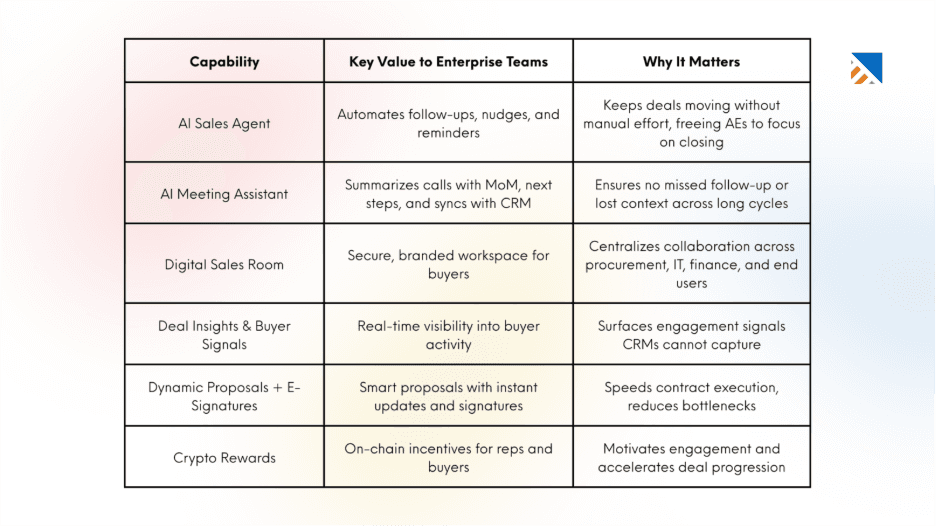
Centralized Buyer Collaboration
Key Value: A digital sales room provides a secure, branded workspace where all stakeholders, procurement, IT, finance, legal, and end users can access proposals, demos, timelines, and communication in one place.
Why It Matters: Enterprise buying committees are fragmented, and stakeholders rarely meet together. A shared hub reduces miscommunication, eliminates scattered email threads, and creates a single source of truth for complex deals.
Real-Time Buyer Insights
Key Value: Digital sales rooms surface engagement signals such as who viewed proposals, how long they engaged, and which stakeholders are active.
Why It Matters: Traditional CRMs only capture seller activity, leaving most of the buyer-side evaluation invisible. Real-time insights give sales teams visibility into buyer intent, helping them prioritize outreach and anticipate objections earlier.
3. Dynamic Content and Proposals
Key Value: Proposals, presentations, and supporting materials can be updated instantly, tracked, and signed digitally with audit trails for compliance.
Why It Matters: Enterprise deals often stall in contract execution. Dynamic proposals accelerate approvals, reduce bottlenecks, and ensure all stakeholders are aligned on the latest version, shortening the path to closure.
4. Automated Meeting Intelligence
Key Value: Integrated AI assistants capture and summarize meetings, generating minutes of meeting, next steps, and syncing insights directly into the sales room.
Why It Matters: In long enterprise cycles, missed context can derail progress. Automated summaries keep teams aligned and ensure every buyer commitment is tracked and acted upon without manual effort.
5. Workflow Automation
Key Value: Digital sales rooms automate repetitive tasks such as reminders, follow-ups, and nudges, ensuring deals keep progressing.
Why It Matters: Enterprise account executives often lose momentum chasing administrative tasks. Automation ensures consistency, reduces manual overhead, and keeps opportunities moving forward.
6. Multi-Stakeholder Alignment
Key Value: By consolidating communication and resources, digital sales rooms enable different functions procurement, IT, finance, and end users, to collaborate asynchronously.
Why It Matters: Enterprise decisions require consensus across diverse stakeholders. A digital sales room ensures that each role has access to tailored information, making alignment faster and more effective.
Talk to our team to get started.
CRM vs. Digital Sales Room: A Functional Comparison
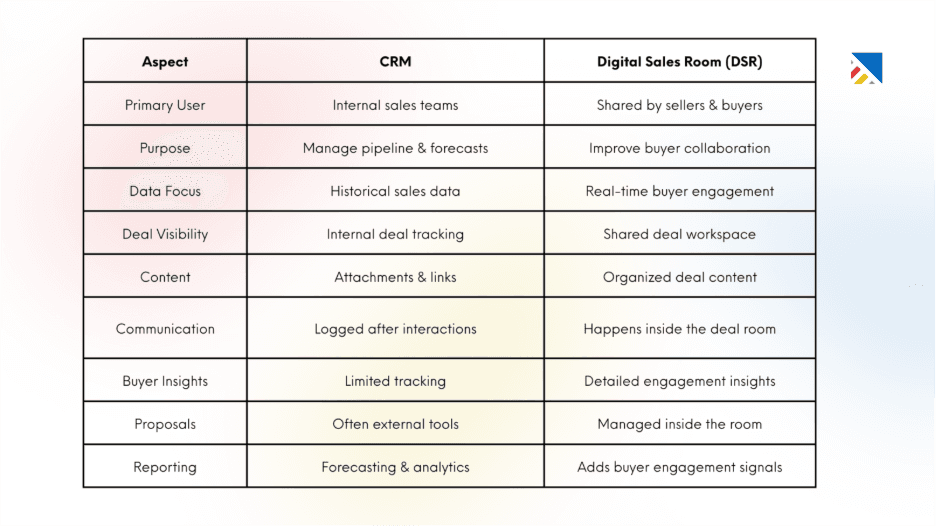
1. Primary User: CRMs are built for internal sales teams, reps, managers, and operations staff to use them to manage accounts and opportunities. DSR Software are designed for both sellers and buyers, creating a shared workspace for collaboration.
2. Core Purpose: CRMs help teams organize pipeline activity, track deal stages, and forecast revenue. DSRs focus on improving the buying experience by giving buyers a structured space to review information and move the deal forward.
3. Data Orientation: CRMs primarily store historical sales data such as activities, notes, and deal updates. DSRs provide real-time engagement signals, showing what buyers are reviewing and how actively they are interacting with the deal.
4. Deal Visibility: In a CRM, deal records reflect the seller’s internal understanding of progress. DSRs create a shared deal environment where both buyers and sellers see the same materials, timelines, and next steps.
5. Content Handling: CRMs typically store files as attachments or external links. DSRs organize presentations, proposals, and supporting documents in a structured, branded workspace that buyers can easily navigate.
6. Communication: CRM communication is usually logged after the interaction happens elsewhere. DSRs centralize collaboration with comments, discussions, and updates directly inside the deal workspace.
7. Buyer Analytics: CRMs offer limited visibility into buyer engagement beyond email opens or activity logs. DSRs provide deeper insights, such as which stakeholders viewed content, what they focused on, and how often they returned.
8. Proposals and Contracts: In many CRM workflows, proposals and contracts are managed through external tools. DSRs bring these documents into the deal room, allowing buyers to review, comment, and sign within the same workspace.
9. Forecasting and Reporting: CRMs remain in the system of record for pipeline management, forecasting, and sales reporting. DSRs complement this by revealing real buyer engagement signals that help teams better assess deal health.
The Key Distinction: A CRM tells you what your rep knows about a deal. A Digital Sales Room tells you what is actually happening inside the buyer's organisation. Both are true. Neither is complete without the other.
Start your free trial and experience it firsthand.
The Integration Layer: Where the Real Value Is Created
CRMs and DSRs deliver limited value when used separately. The real advantage comes when they work together.
Modern integrations create a bidirectional data loop where buyer engagement in the DSR enriches the CRM, and CRM data (accounts, personas, deal stages) automatically personalizes the deal room experience.
Today, leading DSR platforms integrate directly with systems like Salesforce and HubSpot, enabling real-time sync. New stakeholders entering a deal room can be added to the CRM automatically, Mutual Action Plan updates can change deal stages, and signed contracts can close opportunities and trigger renewal workflows, all without manual entry.
The practical impact of this integration is significant:
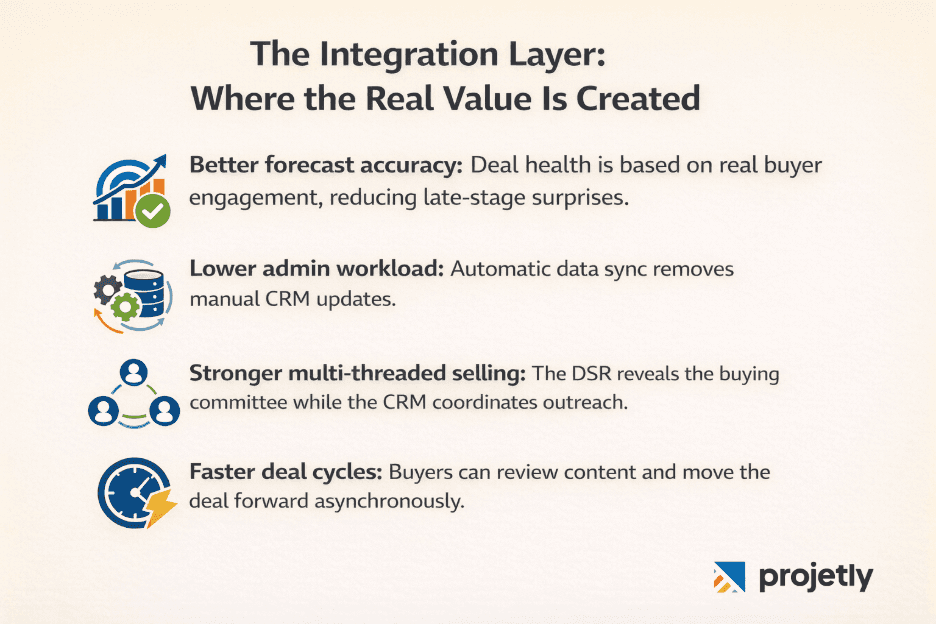
Better forecast accuracy: Deal health is based on real buyer engagement rather than rep-reported updates, reducing late-stage surprises.
Lower admin workload: Data syncs automatically, eliminating the need for manual CRM updates after every interaction.
Stronger multi-threaded selling: The DSR reveals the full buying committee, while the CRM helps coordinate outreach across all stakeholders.
Faster deal cycles: Buyers can review content, ask questions, and move the evaluation forward asynchronously without waiting for the rep.
Why Enterprise Teams Specifically Cannot Operate with Only One
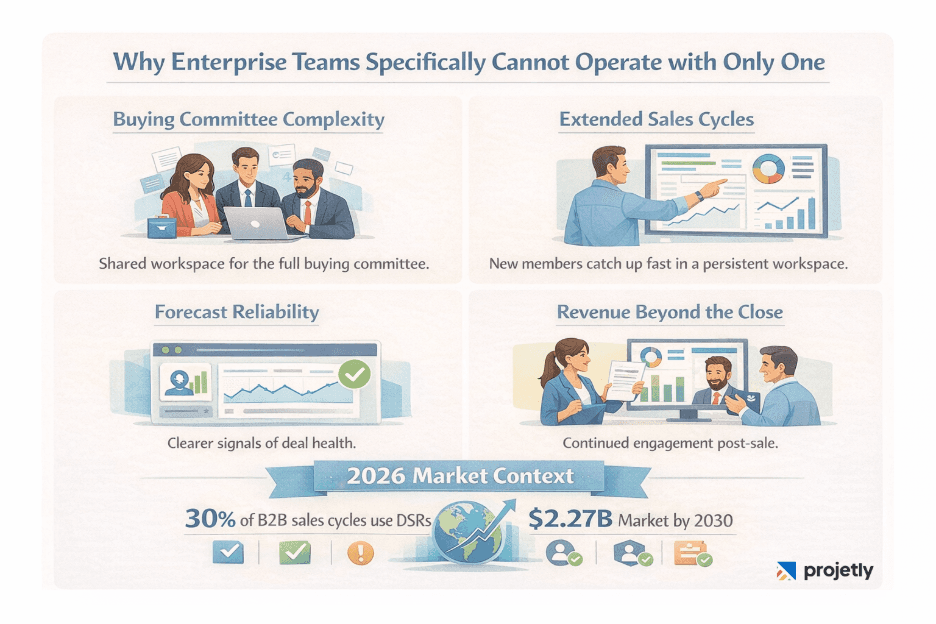
The case for using both tools is strongest in enterprise selling, for reasons that are structural rather than optional.
Buying Committee Complexity: Enterprise deals often involve 8–16 stakeholders. A CRM stores their records, but a DSR enables the entire buying committee to access content, review proposals, and engage in one shared space. This makes stakeholder involvement and engagement directly visible.
Extended Sales Cycles: Enterprise deals typically last 6–12 months. While CRMs document updates, DSRs provide a persistent workspace where new stakeholders can quickly understand previous discussions and continue the evaluation without restarting the process.
Forecast Reliability: CRMs rely on rep-reported deal stages, which can lead to forecast variance. DSRs add buyer engagement signals, showing who is reviewing content and how actively the committee is involved, giving a clearer view of deal health.
Revenue Beyond the Close: CRMs track renewals and expansion opportunities. DSRs maintain the ongoing engagement workspace, supporting QBRs, expansion discussions, and renewal conversations.
2026 Market Context: About 30% of B2B sales cycles now run through Digital Sales Rooms, and the DSR market is projected to reach $2.27B by 2030. The focus for enterprise teams is no longer adoption, but integrating DSRs with their CRM stack.
Take a quick tour and see how it works.
Implementation Principles for Revenue Leaders
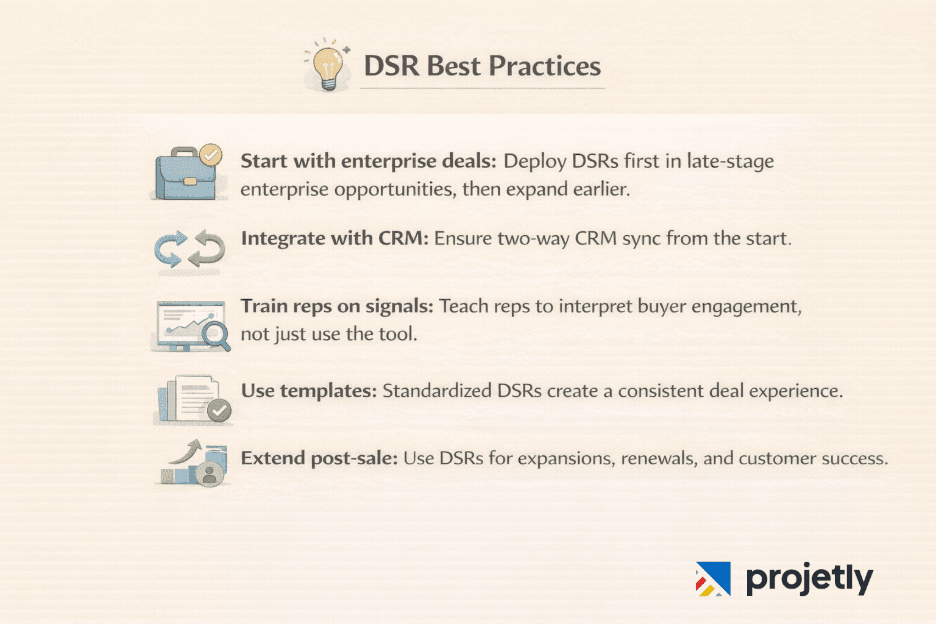
For teams moving from CRM-only selling to an integrated CRM + DSR stack, a few principles tend to separate successful deployments from failed ones:
Start with a specific motion: DSRs add the most immediate value in late-stage enterprise deals where buying committee complexity is highest. Deploy there first, validate the engagement data, and expand to earlier stages once the workflow is established.
Prioritise CRM integration from day one: A DSR that operates as a separate silo creates parallel systems that drift out of sync and add administrative work. Bidirectional CRM sync is not an enhancement, it is the foundation.
Train reps on engagement interpretation, not just tool operation: The value of DSR data is in what it implies. A rep who sees that three new stakeholders accessed the deal room the night before a scheduled call should walk into that call differently. Build this interpretive skill into onboarding.
Use DSR templates for consistency: Well-constructed room templates to ensure that every buyer receives the same quality of organized experience regardless of which rep is running the deal. This matters for brand perception in enterprise accounts where multiple stakeholders are evaluating simultaneously.
Extend beyond the close: Deploy DSRs into the customer's success motion. Use the same engagement analytics to identify at-risk accounts, flag expansion opportunities, and prepare renewal conversations with evidence of value delivered rather than anecdote.
See how it works in a quick walkthrough.
Conclusion: Two Tools, One Revenue Motion
The CRM and the Digital Sales Room are not competing for the same job. They are complementary infrastructure for a revenue motion that has become genuinely more complex, with more stakeholders, longer cycles, more self-directed buyer behaviour, and higher expectations for personalized, organised engagement.
Enterprise sales teams that treat the CRM as sufficient are operating with a fundamental blind spot: they are managing what their reps know, not what their buyers are doing. Teams that add a DSR without integrating it into the CRM are running parallel systems that multiply administrative work and create conflicting data.
The teams winning enterprise deals in 2026 are the ones who have connected these two layers: the CRM as the system of record, the DSR as the system of buyer engagement, and a bidirectional integration that makes each smarter. The CRM tells you where a deal is. The DSR tells you whether the buyer is actually moving toward a decision. You need both to tell the whole story.
You may also like

A Guide to Project Management Professional Certification

Laugh Your Way to Productivity: 50 Workplace Quotes

50 Funny Workplace Memes That’ll Brighten Your Workday.
What Does a Customer-First Mindset Mean? Explained in 2025

What It Takes to be a Great Customer Success Manager in 2025