NEW CLIENT ONBOARDING

By
Sammy Jones
Does Gamified Onboarding Actually Improve SaaS Retention?
Yes, and the lift is measurable. Consider a real pattern we see repeatedly at Projetly: a 3-person CS team at a 200-seat SaaS company running a 14-day trial. They have a solid product, a helpful onboarding email sequence, and a tutorial video that 80% of users skip after 90 seconds. Day-7 retention sits at 34%.
They add a five-step progress checklist with a trial-extension reward at completion. Day-7 retention climbs to 51% within six weeks. No product changes. No new hires. Just structured forward momentum.
That outcome is consistent with the broader data: companies that add game mechanics (progress bars, milestone checklists, badges) to their onboarding flow retain 22% more customers over 12 months, and users hit their first value moment up to 40% faster.
This article covers why gamified onboarding works at a psychological level, six real product examples with concrete outcomes, and a four-step process any Director of Customer Success can use to implement it, without rebuilding the product from scratch.
Not sure where your onboarding breaks are? Projetly's activation-funnel analytics pinpoints every drop-off step in under 10 minutes. → Start your free trial
In this article
What does gamified onboarding actually mean?
Why does the psychology of progress make users stick?
Which mechanics give the best return for the effort?
What do real gamified onboarding flows look like? (6 examples)
How do you implement gamified onboarding in four steps?
What mistakes kill gamified onboarding before it starts?
TL;DR, 5 standalone facts
What does gamified onboarding actually mean?
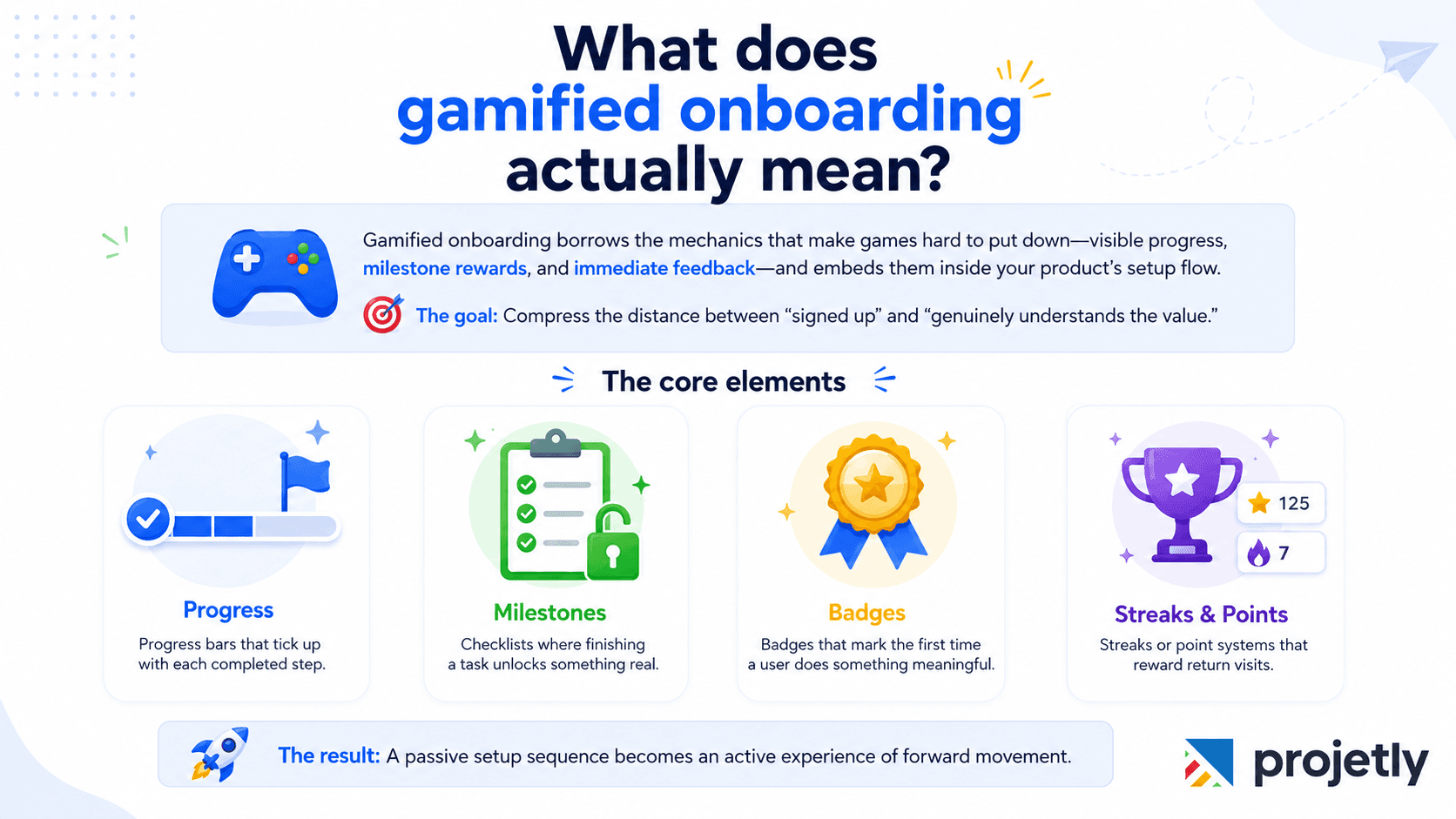
Gamified onboarding borrows the mechanics that make games hard to put down, visible progress, milestone rewards, and immediate feedback, and embeds them inside your product's setup flow. The goal is not entertainment; it is compressing the distance between "signed up" and "genuinely understands the value."
The core elements: progress bars that tick up with each completed step, checklists where finishing a task unlocks something real, badges that mark the first time a user does something meaningful, and streaks or point systems that reward return visits. Used together, they turn a passive setup sequence into an active experience of forward movement.
Why does the psychology of progress make users stick?
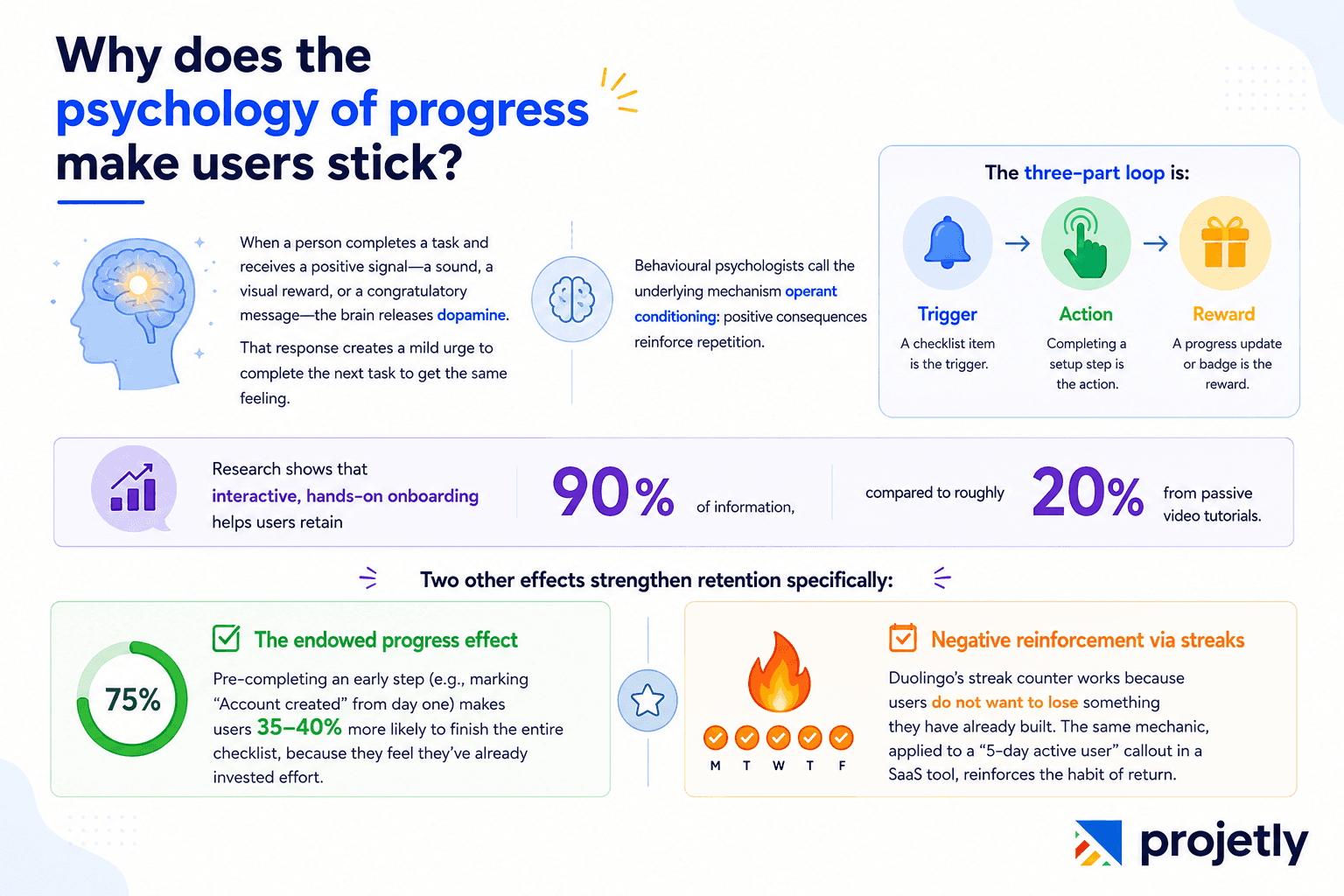
When a person completes a task and receives a positive signal, a sound, a visual reward, or a congratulatory message, the brain releases dopamine. That response creates a mild urge to complete the next task to get the same feeling. Behavioural psychologists call the underlying mechanism operant conditioning: positive consequences reinforce repetition.
The three-part loop is: Trigger → Action → Reward.
In onboarding terms, a checklist item is the trigger, completing a setup step is the action, and a progress update or badge is the reward.
Research shows that interactive, hands-on onboarding helps users retain 90% of information, compared to roughly 20% from passive video tutorials.
Two other effects strengthen retention specifically:
The endowed progress effect: pre-completing an early step (e.g., marking "Account created" from day one) makes users 35–40% more likely to finish the entire checklist, because they feel they've already invested effort.
Negative reinforcement via streaks: Duolingo's streak counter works because users do not want to lose something they have already built. The same mechanic, applied to a "5-day active user" callout in a SaaS tool, reinforces the habit of return.
Which mechanics give the best return for the effort?
Not all mechanics are equal. The table below ranks the six core elements by implementation complexity versus measured impact, so Directors of Customer Success can prioritise budget and engineering time.
Mechanic | What It Does | Psychology Hook | Best For | Implementation Effort |
|---|---|---|---|---|
Progress Bars | Visualises completion of multi-step setup | Discomfort with incompleteness drives finishing | Any flow with 5+ required steps | Low (1–2 days) |
Checklists + Milestone Rewards | Turns tasks into achievements by attaching unlocks | Completion + reward = stronger motivation loop | Trial users on path to paid conversion | Low–Medium (2–5 days) |
Badges & Achievement Markers | Gives visible proof of reaching a first-action milestone | Recognition triggers pride and validation | Key activation moments ("First project created") | Medium (3–5 days) |
Points & Streaks | Encourages repeated usage over time | Habit formation + fear of losing built progress | Products needing daily or frequent return | Medium (5–7 days) |
Interactive Quizzes | Replaces passive video with engagement and knowledge checks | Active participation improves retention by 4× vs passive | Complex tools with a steep learning curve | Medium–High (1–2 weeks) |
Levels & Progression Tiers | Creates a growth narrative from beginner to advanced user | Identity shift builds long-term motivation | Onboarding journeys spanning multiple sessions | High (2–4 weeks) |
What do real gamified onboarding flows look like? (6 examples)
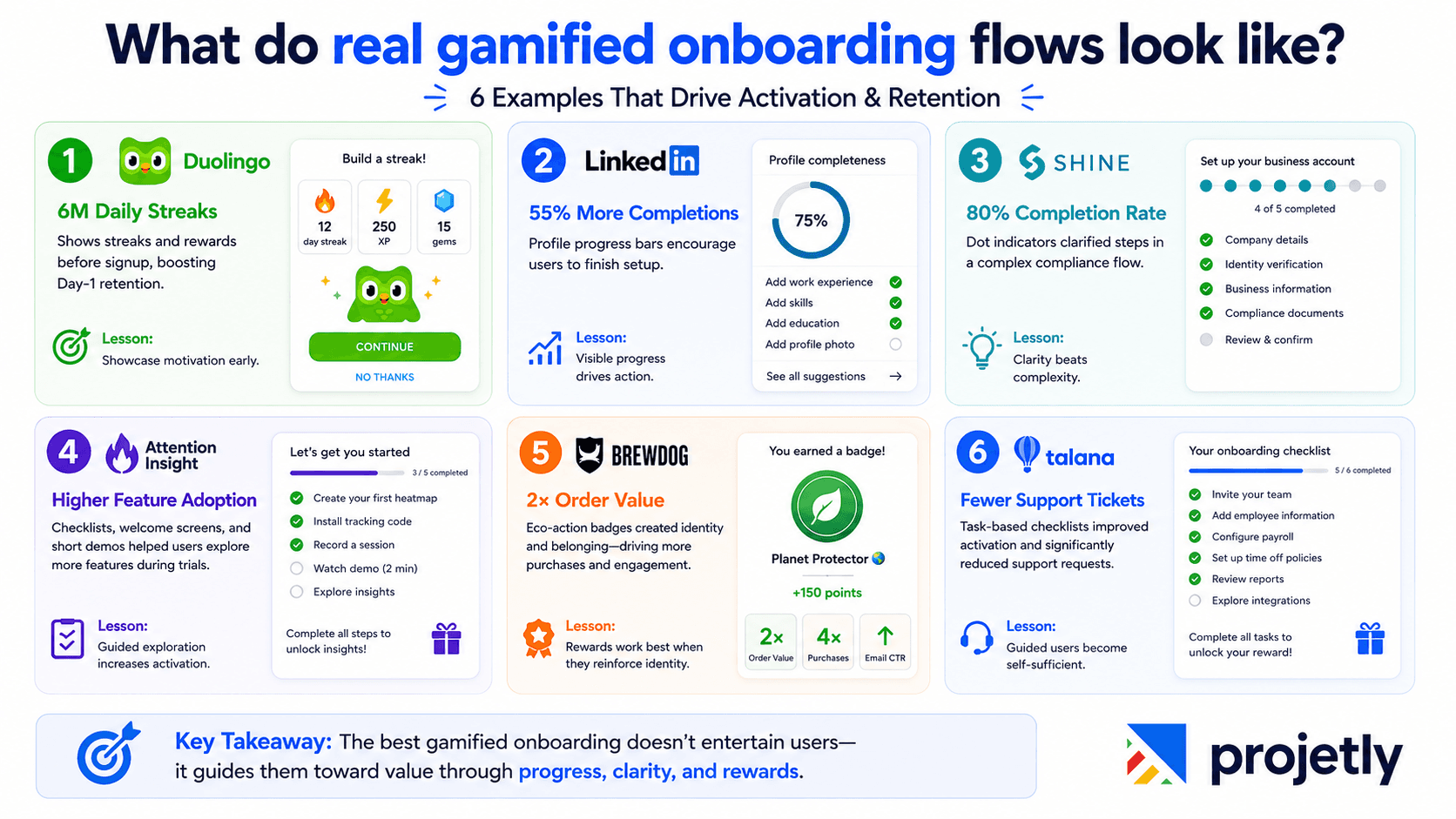
1. Duolingo: the streak that created 6 million daily habits
Duolingo shows its points and streak system before a user creates an account. Showing the reward system up front increased Day-1 retention significantly, and today, over 6 million users maintain active streaks. The takeaway: demonstrate what the user is signing up for, the motivation structure itself, before asking for commitment.
2. LinkedIn: a progress bar that lifted completions by 55%
LinkedIn's profile-completion bar creates cognitive discomfort at 75%. Users feel compelled to close the gap. The result was a 55% uplift in profile completion rates. Any B2B SaaS product with a multi-step setup should treat this as a baseline, not a nice-to-have.
3. Shine (French fintech): dot indicators drove an 80% completion rate
Shine used dot-based progress indicators in a legally complex banking compliance onboarding flow. Most fintechs achieve 40–50% completion on similar flows; Shine's visual "here's where you are, here's what's left" treatment pushed completion to 80%. Clarity of position, not gamification complexity, was the lever.
4. Attention Insight: checklist activation raised feature adoption noticeably
Attention Insight added welcome screens, short demo videos, and a task checklist to its trial flow. Activation rates rose, and users engaged with significantly more features before trial expiry. The checklist guided exploration rather than leaving users to wander and give up.
5. BrewDog: eco-action badges doubled order value
BrewDog awarded badges for eco-friendly actions during signup and first use. Average order values doubled, purchases quadrupled, and email click-through rates surged. The badge worked not because of its visual design, but because it gave users an identity: not just a customer, but a member of something worth belonging to.
6. Talana (HR platform): checklist-led activation cut support tickets
Talana structured onboarding as a task-based checklist with completion rewards. Activation rates climbed, and support ticket volume dropped. When users feel guided rather than lost, they self-serve instead of asking for help, a direct reduction in CS overhead.
How do you implement gamified onboarding in four steps?
Step 1: Audit your current drop-off points
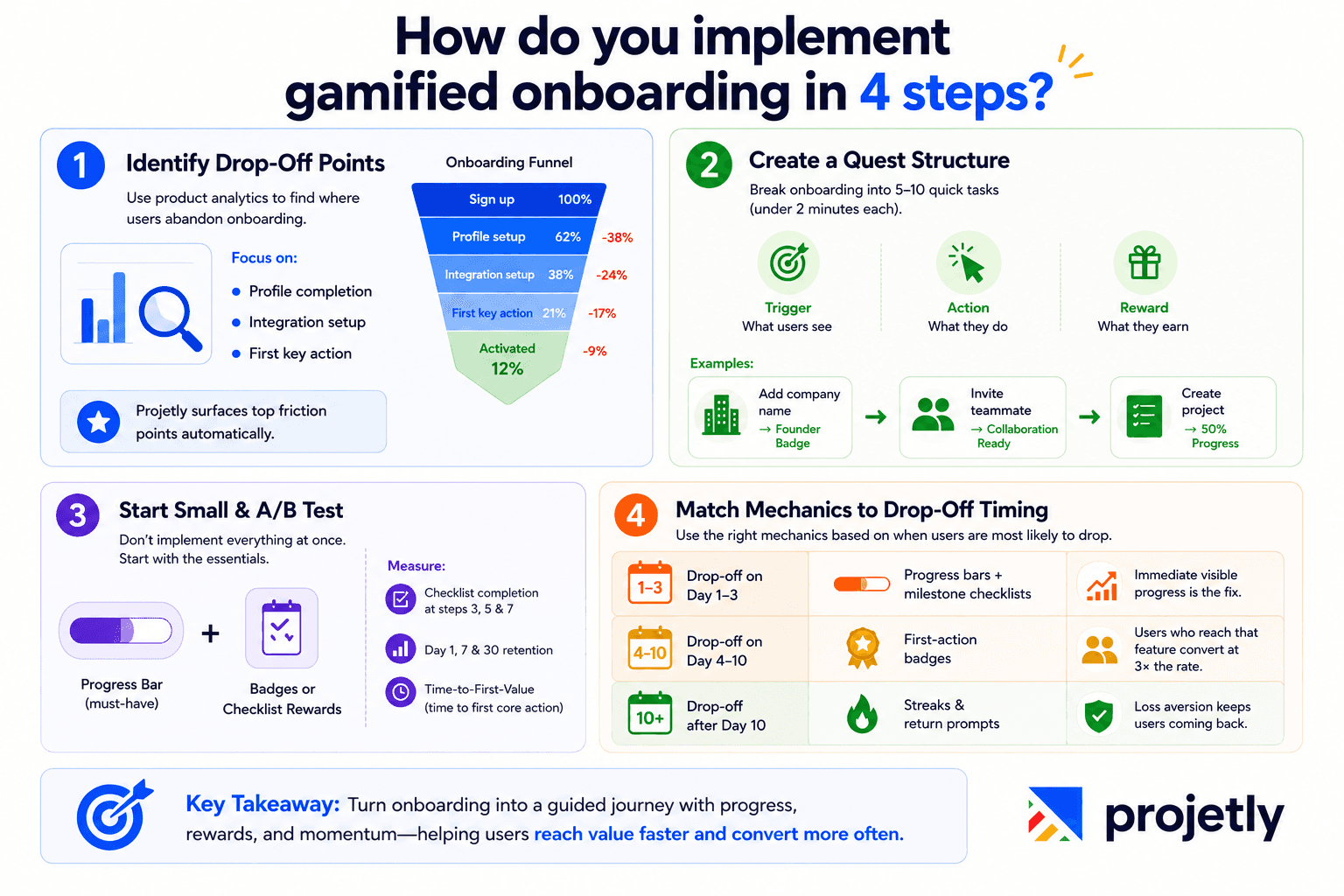
Use product analytics to map your onboarding funnel. Find the steps with the highest abandonment rates. Common high-friction points: profile completion, first integration setup, first core action (first task created, first team member invited, first report run). These are your highest-leverage targets.
Projetly's activation-funnel view surfaces these drop-offs automatically, ranked by impact on Day-30 retention. Most teams identify their top three friction points within one session.
Step 2: Design the quest structure
Break onboarding into 5–10 discrete tasks, each completable in under two minutes. Structure each step with three elements: a clear trigger (what the user sees), a clear action (what they do), and a clear reward (what happens next). Example sequence:
Add your company name → "Founder" badge unlocked
Invite your first teammate → "Collaboration Ready" status
Create your first project → progress bar hits 50%
Step 3: Choose two mechanics and A/B test
Don't implement everything at once. Start with a progress bar (always) and one other mechanic, badges or a checklist with milestone rewards are lowest-effort and easiest to measure. A/B test the gamified version against your current flow. Track three metrics:
Checklist completion rate at steps 3, 5, and 7
Day-1, Day-7, and Day-30 retention
Time-to-first-value (how long until a user completes their first core action)
Step 4: Calibrate mechanics to your trial-to-paid motion
As Director of Customer Success, your primary lever is the trial-to-paid conversion window. Gamification mechanics should be chosen based on where in that window your users are most likely to drop. Use this decision framework:
Drop-off on Day 1–3: use a progress bar and a milestone checklist with a trial-extension reward at completion. Immediate visible progress is the fix.
Drop-off on Day 4–10: use first-action badges tied to your highest-retention feature. Users who reach that feature convert at 3× the rate of those who don't.
Drop-off after Day 10: introduce a streak or return-visit prompt. Users who have already invested time feel loss aversion when they consider stopping, use that.
What mistakes kill gamified onboarding before it starts?
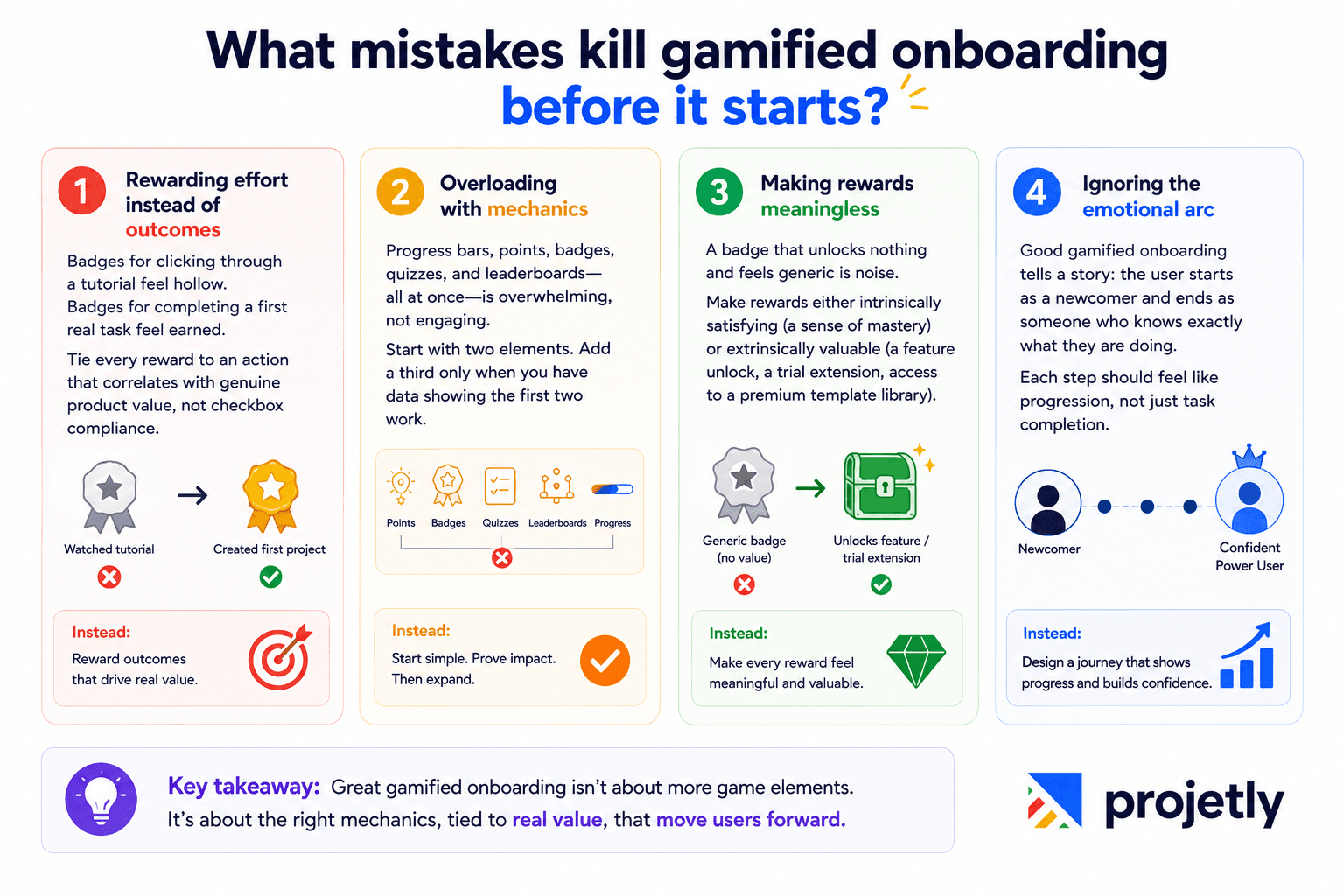
Rewarding effort instead of outcomes: Badges for clicking through a tutorial feel hollow. Badges for completing a first real task feel earned. Tie every reward to an action that correlates with genuine product value, not checkbox compliance.
Overloading with mechanics: Progress bars, points, badges, quizzes, and leaderboards, all at once, is overwhelming, not engaging. Start with two elements. Add a third only when you have data showing the first two work.
Making rewards meaningless: A badge that unlocks nothing and feels generic is noise. Make rewards either intrinsically satisfying (a sense of mastery) or extrinsically valuable (a feature unlock, a trial extension, access to a premium template library).
Ignoring the emotional arc: Good gamified onboarding tells a story: the user starts as a newcomer and ends as someone who knows exactly what they are doing. Each step should feel like progression, not just task completion.
TL;DR: 5 standalone facts
Companies with gamified onboarding retain 22% more customers over 12 months compared to those using traditional setup flows.
Interactive, hands-on onboarding produces 90% information retention; passive video tutorials produce roughly 20%.
Gamified onboarding cuts time-to-first-value by up to 40%, meaning users reach their "aha moment" faster and are less likely to churn before trial expiry.
LinkedIn's profile-completion bar alone drove a 55% uplift in completions. A progress bar is the single highest-ROI gamification element to implement first.
The most common implementation mistake is rewarding effort (clicking through tutorials) instead of outcomes (completing a first real task) — follow rewards accelerate churn, not retention.
See how Projetly maps and fixes your onboarding drop-offs. Book a 15-minute personalised demo
Frequently Asked Questions
1. How long does it take to see results from gamified onboarding?
Most teams see measurable movement in Day-7 retention within 4–6 weeks of launching a progress bar and milestone checklist. Deeper mechanics like badges and streaks take longer to show impact because they depend on repeat behaviour building up over time. Start with the two lowest-effort elements, measure for 30 days, then layer in more.
2. Do gamification mechanics work for complex B2B products with long setup times?
Yes, in fact, they work better. The more steps your onboarding requires, the more users need visible proof they're moving forward. Dot indicators drove an 80% completion rate for Shine's banking compliance flow, one of the most friction-heavy onboarding contexts in fintech. Complexity is the problem gamification is best designed to solve.
3. What's the difference between a gamified checklist and a standard onboarding checklist?
A standard checklist tells users what to do. A gamified checklist attaches a consequence to completion, a feature unlock, a trial extension, a badge, and a progress bar moving to 100%. That consequence is what triggers the dopamine response and creates the motivation to finish. Without it, a checklist is just a to-do list.
4. Can gamified onboarding hurt the user experience if implemented badly?
Yes. Rewarding low-value actions (clicking through a tutorial), stacking too many mechanics at once, or offering badges that unlock nothing will make users feel patronised rather than motivated. The rule is: every reward must feel either earned or useful. If it feels like a participation trophy, it's doing more harm than good.
5. How do you measure whether your gamified onboarding is actually working?
Track three numbers: checklist completion rate (are users finishing the flow?), time-to-first-value, and Day-30 retention (are they still active a month later?). If completion rate rises but Day-30 retention doesn't move, your rewards are attached to the wrong actions; go back to Step 1 and audit which actions actually predict long-term engagement.
You may also like

A Guide to Project Management Professional Certification

Laugh Your Way to Productivity: 50 Workplace Quotes

50 Funny Workplace Memes That’ll Brighten Your Workday.
What Does a Customer-First Mindset Mean? Explained in 2025

What It Takes to be a Great Customer Success Manager in 2025