Digital Sales Room

By
Dhruv
11 Visits. Zero Visibility. That's What a Proposal Without a DSR Looks Like.
Sending an untracked proposal into the void is like swinging in the dark; you never know if it landed, was forwarded, or got completely ignored. That’s exactly why high-performing sales teams are replacing static attachments with AI-powered Digital Sales Rooms that provide real-time visibility, buyer engagement tracking, and a centralized space for every deal
Picture this: you've spent three hours crafting a tailored proposal. You attach it to an email, hit send, and then you wait. Maybe you get a read receipt. Maybe you don't. You follow up once, twice, three times.
The prospect says they're "still reviewing." You have no idea who "still reviewing" means, is it the champion, the CFO, the legal team, all three? You're flying completely blind at the moment that matters most.
This isn't a hypothetical scenario. It's how the majority of B2B sales teams are still operating in 2026, and it's costing them deals they should be winning.
"The proposal is not the end of the sale. It's the beginning of the internal buying process, one you have zero control over if you're sending a static PDF."
A Digital Sales Room (DSR) fundamentally changes this dynamic. Instead of an email attachment that disappears into the buyer's inbox, a DSR is a private, persistent microsite where buyers and sellers collaborate, and where sellers finally get the visibility they need to close.
What Exactly Is a Digital Sales Room?
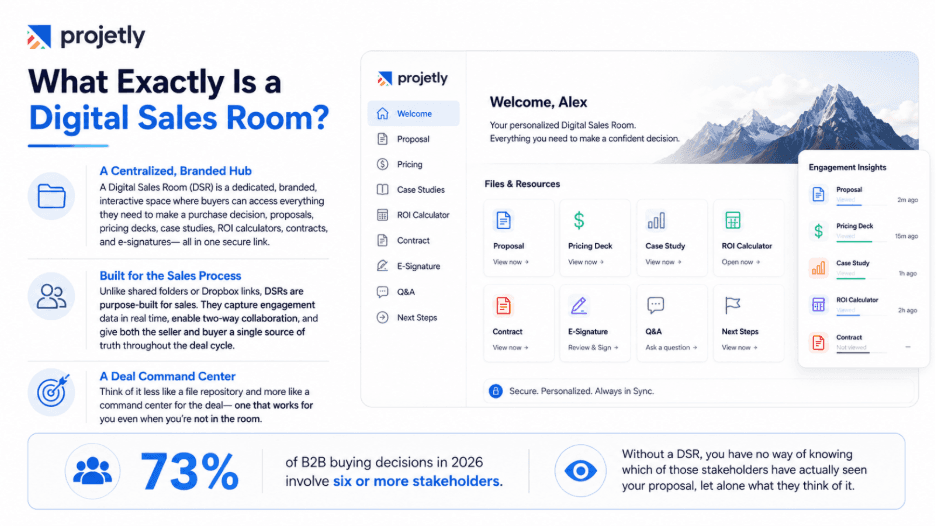
A Digital Sales Room is a dedicated, branded, interactive web space that consolidates every asset a buyer needs to make a purchase decision, proposals, pricing decks, case studies, ROI calculators, contract documents, and e-signature capabilities into one secure, personalized link.
Unlike a shared Google Drive folder or a Dropbox link, a DSR is purpose-built for the sales process. It captures engagement data in real time, enables two-way collaboration, and gives both the seller and buyer a single source of truth throughout the deal cycle.
Think of it less like a file repository and more like a command centre for the deal, one that works for you even when you're not in the room.
73% of B2B buying decisions in 2026 involve six or more stakeholders. Without a DSR, you have no way of knowing which of those stakeholders have seen your proposal, let alone what they think of it.
The Four Problems a DSR Solves That Email Never Will
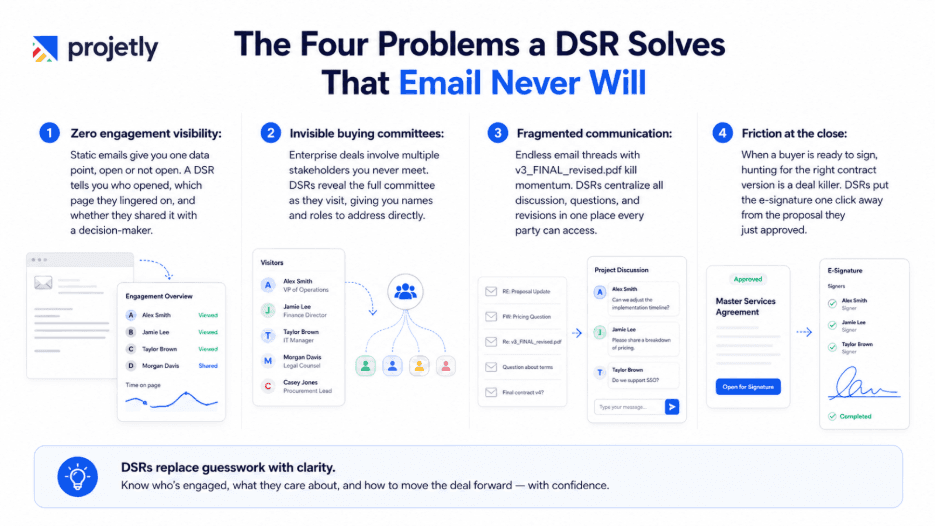
Zero engagement visibility: Static emails give you one data point, open or not open. A DSR tells you who opened, which page they lingered on, and whether they shared it with a decision-maker.
Invisible buying committees: Enterprise deals involve multiple stakeholders you never meet. DSRs reveal the full committee as they visit, giving you names and roles to address directly.
Fragmented communication: Endless email threads with v3_FINAL_revised.pdf kill momentum. DSRs centralize all discussions, questions, and revisions in one place that every party can access.
Friction at the close: When a buyer is ready to sign, hunting for the right contract version is a deal killer. DSRs put the e-signature one click away from the proposal they just approved.
What a Proposal With a DSR Actually Looks Like
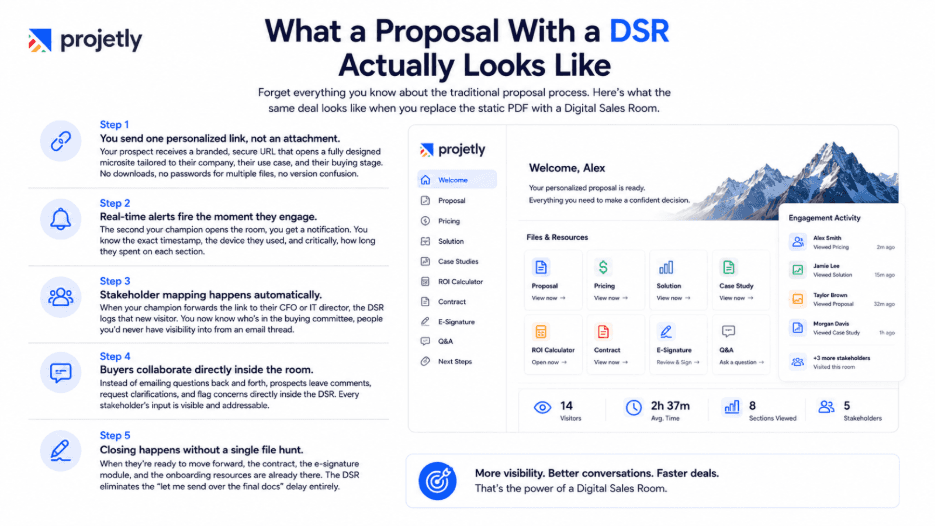
Forget everything you know about the traditional proposal process. Here's what the same deal looks like when you replace the static PDF with a Digital Sales Room.
Step 1: You send one personalized link, not an attachment. Your prospect receives a branded, secure URL that opens a fully designed microsite tailored to their company, their use case, and their buying stage. No downloads, no passwords for multiple files, no version confusion.
Step 2: Real-time alerts fire the moment they engage. The second your champion opens the room, you get a notification. You know the exact timestamp, the device they used, and critically, how long they spent on each section. Is the pricing page getting 80% of the time? That tells you something important.
Step 3: Stakeholder mapping happens automatically. When your champion forwards the link to their CFO or IT director, the DSR logs that new visitor. You now know who's in the buying committee, people you'd never have visibility from an email thread, so you can arm your champion with the right talking points for each audience.
Step 4: Buyers collaborate directly inside the room. Instead of emailing questions back and forth, prospects leave comments, request clarifications, and flag concerns directly inside the DSR. Every stakeholder's input is visible and addressable without starting a new thread.
Step 5: Closing happens without a single file hunt. When they're ready to move forward, the contract, the e-signature module, and the onboarding resources are already there. The DSR eliminates the "let me send over the final docs" delay entirely.
Discover How DSR Software Works
Real-Time Analytics: The Unfair Advantage You've Been Missing
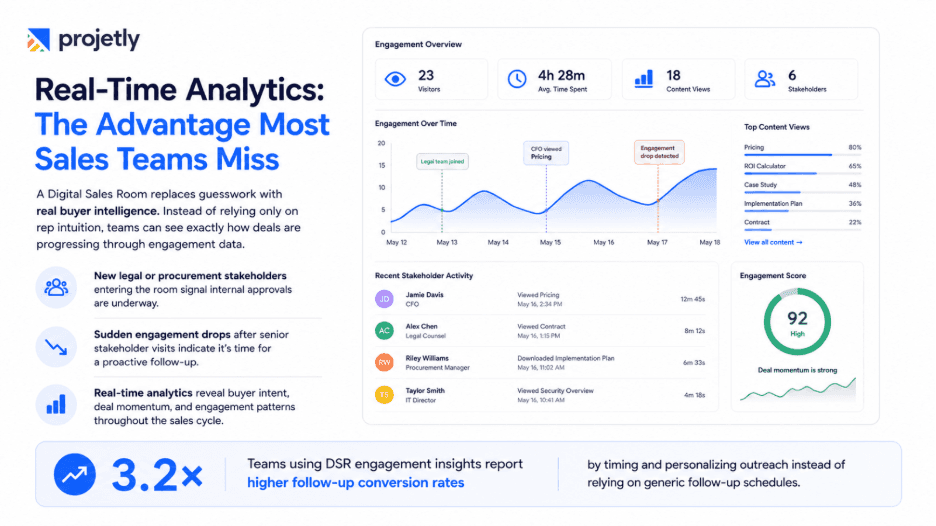
The single biggest shift a DSR creates for your sales process is this: you stop guessing and start knowing. Sales has always been a discipline where the best reps develop intuition over hundreds of deals, an instinct for when a deal is hot, when it's stalling, and when a stakeholder has gone cold.
A DSR makes that intuition data-driven for every rep on your team, regardless of experience level.
What the data tells you
When a new stakeholder enters the Digital Sales Room from a legal or procurement email domain, teams can instantly identify where the deal stands in the buyer’s internal approval process.
When engagement suddenly drops after multiple senior stakeholders visit the room, it signals the right moment for a proactive follow-up instead of waiting passively.
This level of operational intelligence gives sales teams real-time visibility into buyer intent, engagement patterns, and deal momentum.
Teams using Digital Sales Rooms gain a major advantage over competitors by improving situational awareness throughout the sales cycle.
3.2× higher follow-up conversion rates, Sales reps using DSR engagement data to personalize and time outreach report more than three times better conversion rates compared to generic follow-ups based on fixed intervals.
Buyer Enablement: Helping Your Champion Sell Internally
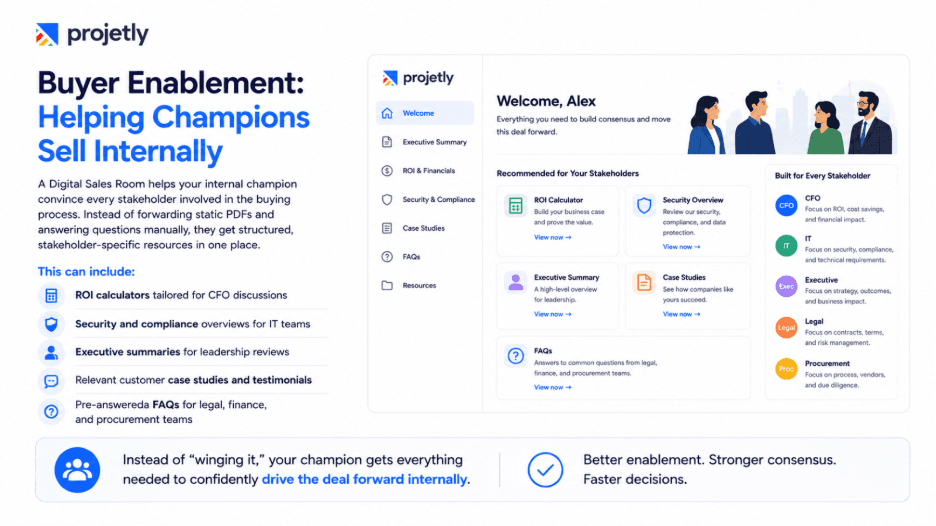
Here's the part of the DSR conversation that most people skip over, and it's arguably the most powerful capability of all.
Your champion loves your product. They've seen the demo, they're sold on the vision, and they want to move forward. But they can't approve the budget alone. They need to convince their CFO that the ROI is real, reassure their IT director about security and integration, and satisfy legal about the contract terms.
With a static proposal, your champion is on their own. They forward your PDF, answer questions out of context, and hope the other stakeholders form the right impression without any structure to guide them.
A DSR changes this completely. You can equip your champion with purpose-built resources for each stakeholder they need to convince:
An interactive ROI calculator pre-populated with their numbers, built specifically for the CFO conversation
A security and compliance overview, formatted for an IT director's evaluation criteria, not buried in a 40-page contract
A one-page executive summary with outcomes and business case language, designed for a five-minute stakeholder briefing
Customer testimonials and case studies from companies in the same industry, at the same scale, with comparable challenges
A pre-answered FAQ covering the questions every CFO, legal team, and IT director asks at this stage of the buying cycle
This is buyer enablement at its most practical: giving your internal advocate everything they need to be a credible, confident voice for your solution inside their own organization, without relying on them to wing it.
Still Have Questions? Contact Us Today
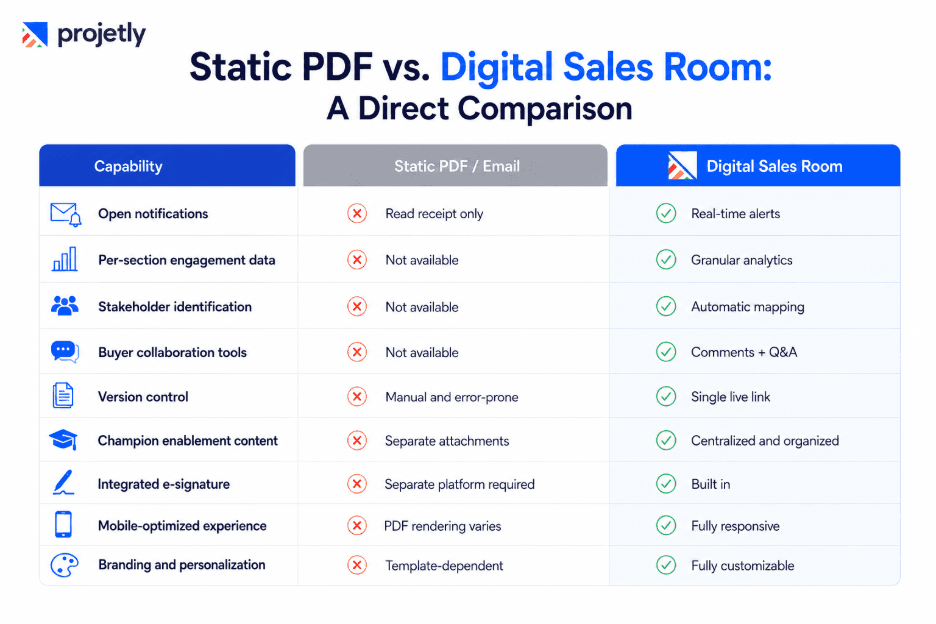
Static PDF vs. Digital Sales Room: A Direct Comparison
Frictionless Closing: Why DSRs Accelerate Deal Cycles
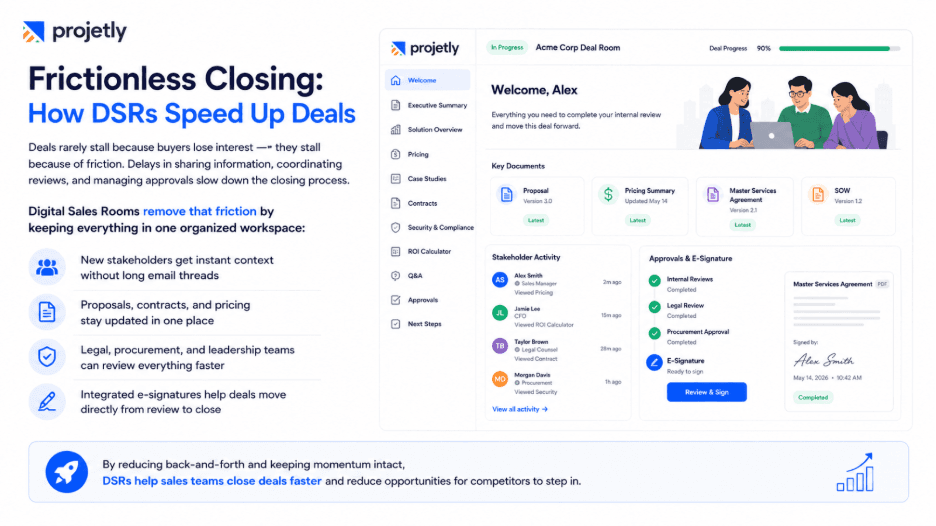
Deal cycles don't stall because buyers change their minds. They stall because of friction, friction in getting the right information to the right person at the right time, friction in coordinating internal reviews, friction in getting the contract in front of someone who can sign it.
Every day a deal stays open is another day a competitor can get a foot in the door. Shortening the close is not just a revenue acceleration play, it's a competitive defense strategy.
Digital Sales Rooms address friction at every stage of the final mile.
When a new stakeholder enters the buying process, they don't need to be brought up to speed via an email chain. The DSR gives them the full context, organized in the order that makes sense for their role. When a legal team wants to review the contract alongside the proposal, both documents are in the same place. When procurement asks for updated pricing, you update the live room, there's no risk of them reviewing an outdated version.
And when they're ready to sign? The e-signature module is right there. No "let me send over the DocuSign link." No waiting for a new email to arrive. The momentum you've built goes straight through to the close without the air going out of the tires.
Which Teams Should Be Using DSRs Right Now?
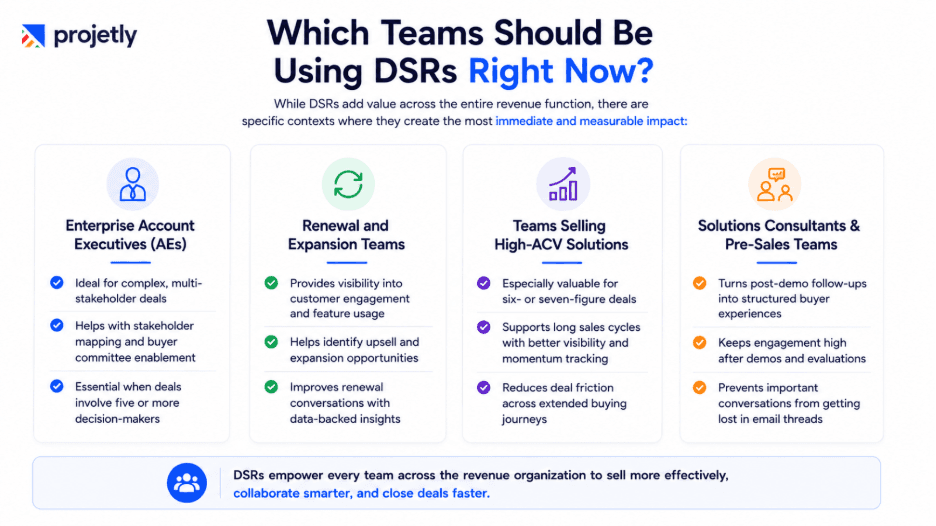
While DSRs add value across the entire revenue function, there are specific contexts where they create the most immediate and measurable impact:
Enterprise Account Executives (AEs)
Ideal for complex, multi-stakeholder deals
Helps with stakeholder mapping and buyer committee enablement
Essential when deals involve five or more decision-makers
B. Renewal and Expansion Teams
Provides visibility into customer engagement and feature usage
Helps identify upsell and expansion opportunities
Improves renewal conversations with data-backed insights
C. Teams Selling High-ACV Solutions
Especially valuable for six- or seven-figure deals
Supports long sales cycles with better visibility and momentum tracking
Reduces deal friction across extended buying journeys
D. Solutions Consultants & Pre-Sales Teams
Turns post-demo follow-ups into structured buyer experiences
Keeps engagement high after demos and evaluations
Prevents important conversations from getting lost in email threads
How to Evaluate DSR Platforms in 2026
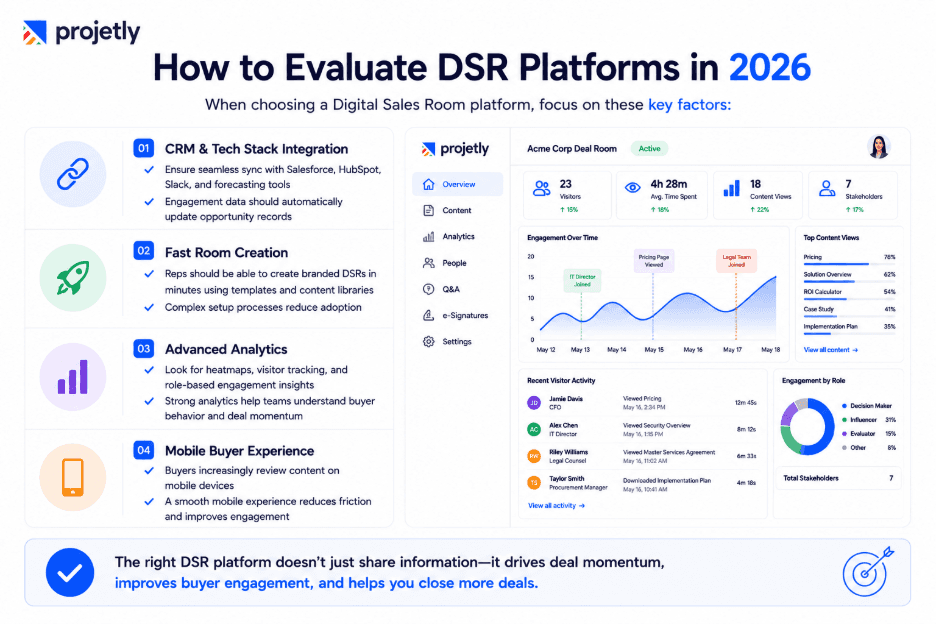
The DSR market has matured significantly. There are now platforms purpose-built for different segments, team sizes, and deal types. Here's what to evaluate before committing:
CRM and tech stack integration: A DSR that doesn't feed data back into your Salesforce or HubSpot instance is only solving half the problem. Look for native bi-directional sync so engagement signals automatically update opportunity records, trigger alerts in Slack, and inform your forecasting models.
Time-to-room creation: If building a DSR takes 45 minutes per deal, adoption will collapse under quota pressure. The best platforms let reps spin up a fully branded, content-populated room in under five minutes by pulling from pre-built templates and a centralized content library.
Analytics depth and usability: Aggregate views are table stakes. What separates good DSR analytics from great is per-section heatmaps, individual visitor tracking across multiple sessions, and role-based filtering that lets you see what your champion has viewed versus what the CFO has reviewed.
Mobile experience for buyers: Over 60% of business content is now consumed on mobile. If your DSR renders a desktop web page on a smartphone, you're adding friction at exactly the wrong moment. Test the mobile experience as a buyer before you commit to any platform.
What Happens to Teams That Don't Make the Switch
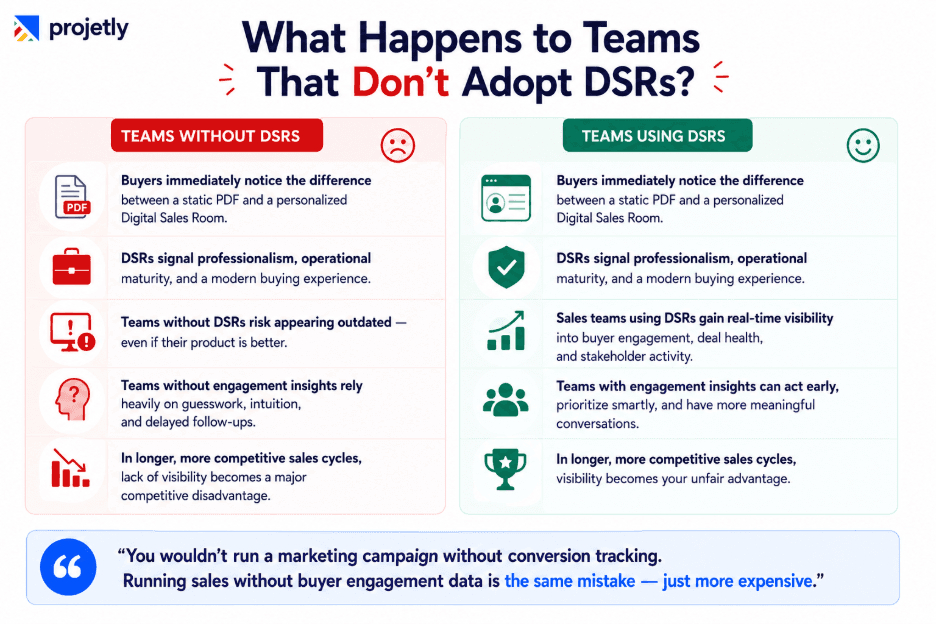
Here's the uncomfortable reality: the gap between DSR-enabled and non-DSR sales teams is not theoretical. It's measurable, and it's widening.
When a buyer receives a static PDF from one vendor and an immersive, personalized DSR from another, the contrast is immediate and visceral. The DSR signals operational maturity, attention to detail, and genuine investment in the buyer's experience. The PDF signals the opposite, even if the underlying product is superior.
Perception shapes decisions. A buyer who feels like they're working with a sophisticated, modern vendor will have more confidence in that vendor's ability to deliver a sophisticated, modern solution. The DSR is not just a tool, it's a statement about how you operate.
Beyond perception, there's the operational gap. Teams with full buyer engagement visibility can prioritize their pipeline with accuracy, time their follow-ups with precision, and identify at-risk deals before they slip. Teams without that visibility are relying on intuition and hope, which works well for experienced reps in favourable market conditions and poorly in every other scenario.
In 2026, with longer sales cycles, more skeptical buyers, and tighter budgets across the board, operating without that visibility is not a neutral position. It's a competitive disadvantage you're handing to whoever you're selling against.
"You wouldn't run a marketing campaign without conversion tracking. Running your sales process without buyer engagement data is the same mistake, just more expensive."
Getting Started: Your First DSR in Under a Week
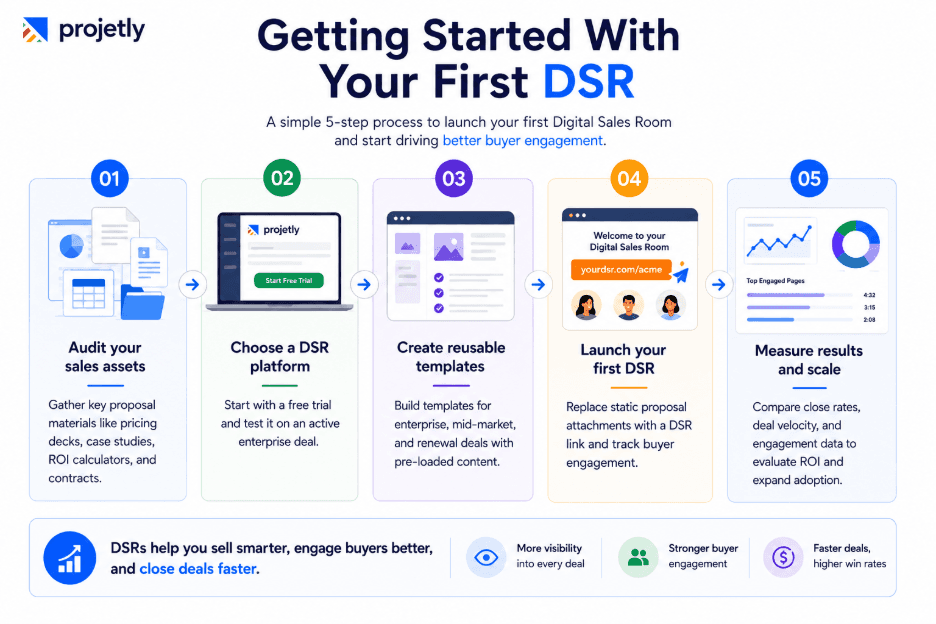
Adopting DSRs doesn't require a six-month implementation project. Most modern platforms can be live and generating value within days.
Step 1: Audit your current proposal assets. Identify the five to eight content pieces that appear in almost every proposal, pricing deck, case studies, ROI calculator, one-pager, and contract template. These become the foundation of your DSR content library.
Step 2: Choose a platform and activate your trial. Most leading platforms offer 14-day trials with full feature access. Start with one deal, ideally a mid-funnel enterprise opportunity where the buying committee is already engaged.
Step 3: Build one reusable template per persona. Create an enterprise template, a mid-market template, and a renewal template. Pre-populate each with the relevant content. Personalize for each deal by swapping in the prospect's logo, their specific use case, and tailored case studies.
Step 4: Send your first room and study the data. Replace your next proposal email attachment with a DSR link. Watch what happens. Who visits? Which sections get the most attention? Use that data to inform your next follow-up call rather than leading with a generic check-in.
Step 5: Measure and expand. After four to six weeks, compare close rates, deal velocity, and average contract values on DSR-enabled deals against your baseline. The data will make the ROI case for broader team rollout on its own.
Stop sending proposals into the void.
Every day you rely on static attachments is another day of flying blind on deals that matter. Digital Sales Rooms give you the visibility, the buyer experience, and the closing velocity your quota demands. Explore Walnut.io or Mindtickle Revenue Hub to see what a modern sales motion looks like, then build your first room this week.
Begin Your Free Journey. Start Your Free Trial Today.
Frequently Asked Questions
1. How is a DSR different from a proposal tool like Proposify or PandaDoc?
Proposal tools help you build and send the document. A DSR manages everything that happens after buyer engagement, stakeholder tracking, collaboration, and closing. Many teams use both together.
2. How long does it take to set up a DSR for a live deal?
With a pre-built template, most reps have a fully branded room ready in under five minutes. Initial setup, branding, assets, and first template take two to three hours. Every room after that is just personalizing a template.
3. Do buyers need to create an account or download anything?
No. Buyers access the room through a single secure link with no login or download required. The experience is completely frictionless from the buyer's side.
4. Will prospects find the engagement tracking intrusive?
Not if you use it well. Buyers are used to personalized digital experiences. The difference is timing; using data to send a relevant, well-timed follow-up feels attentive. Calling thirty seconds after they open the room feels like surveillance.
5. Does a DSR integrate with Salesforce and HubSpot?
Yes. Most leading platforms offer native integrations with Salesforce, HubSpot, Outreach, and Salesloft. Engagement data syncs back to your CRM automatically. Always confirm native over Zapier-dependent integrations before committing.
6. What happens to the DSR after the deal closes?
Many teams repurpose it as an onboarding hub, swapping sales content for implementation guides, training materials, and CS contacts. It creates a seamless handoff and gives new customers one familiar place for everything.
7. How do I get leadership buy-in to roll out DSRs team-wide?
Run a small pilot on five to ten deals and track velocity, close rate, and ACV against your baseline. Frame the case around pipeline visibility and forecast accuracy, not buyer experience, and the numbers will make the argument for you.
You may also like

A Guide to Project Management Professional Certification

Laugh Your Way to Productivity: 50 Workplace Quotes

50 Funny Workplace Memes That’ll Brighten Your Workday.
What Does a Customer-First Mindset Mean? Explained in 2025

What It Takes to be a Great Customer Success Manager in 2025