PSA Software

By
Avaran

Cloud-Based vs. On-Premise PSA Software: How to Choose the Right Solution in 2026
Running a professional services firm is rarely straightforward. Projects expand in scope, billable hours get missed, and profitability is hard to see in real time, especially when your team is spread across time zones or juggling a dozen concurrent engagements.
Professional Services Automation (PSA) software was built to fix exactly that: bringing project management, resource allocation, time tracking, and billing together in one platform. But once you decide you need a PSA tool, a second, equally important question follows: should it live in the cloud, or on your own servers?
This guide breaks down cloud-based vs. on-premises PSA software clearly and honestly, so you can make the right call for your firm in 2026, whether you're a 50-person consultancy or a SaaS company scaling toward $50M in revenue.
What is PSA Software, and Why Does Deployment Model Matter?
PSA software consolidates the core operational functions of a services business, project planning, resource scheduling, time and expense tracking, billing, and analytics into a single system of record. Unlike generic project management tools or standalone CRMs, PSA platforms are purpose-built for firms where time is the product and utilization drives profitability.
The deployment model, cloud or on-premises determines where that system lives, who manages it, how you access it, and what it costs you over time. It's not just a technical decision; it shapes your team's day-to-day experience, your IT overhead, and your ability to scale.
The PSA market is growing at 7–10% annually. By 2026, cloud solutions will make up over 60% of deployments worldwide, but cloud isn’t automatically the right fit for every firm.
This keeps the growth and adoption trends clear while preserving the nuance that deployment choices depend on context.
Cloud-Based PSA Software: The Case for Flexibility
Cloud PSA software is hosted on the vendor's infrastructure (or a major cloud provider like AWS or Azure) and delivered to your team via a browser or mobile app. You don't install anything on local servers; you subscribe, configure, and go.
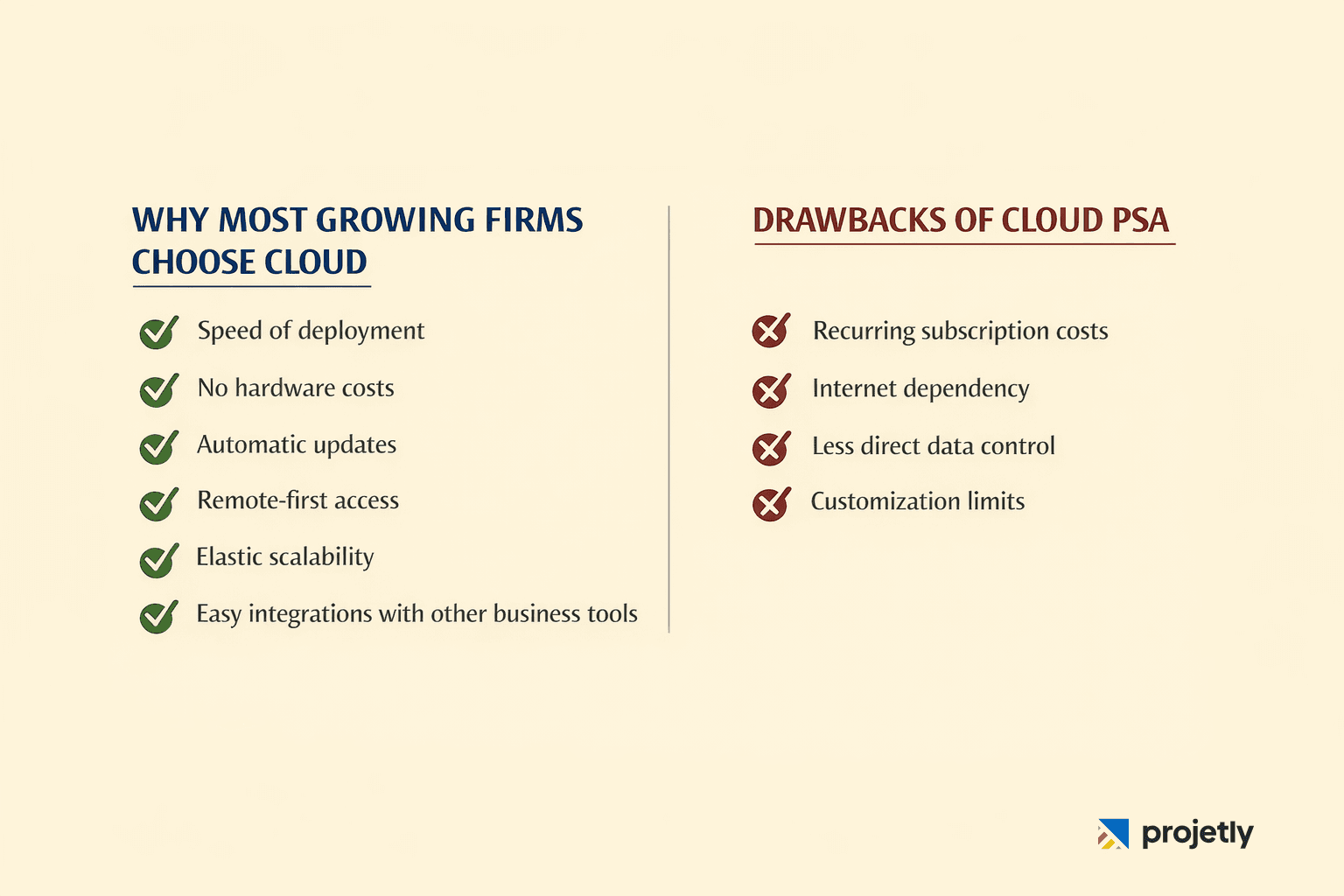
Why Most Growing Firms Choose Cloud
Speed of Deployment: A cloud PSA tool can be up and running in days or weeks, not months. For firms experiencing rapid growth, that agility is worth a great deal.
No Hardware Costs: The vendor manages servers, backups, and infrastructure upgrades. Your capital budget stays focused on people and growth, not racks.
Automatic updates: Features, security patches, and compliance updates roll out without your IT team lifting a finger or scheduling a maintenance window at 2 AM.
Remote-first by Design: Distributed teams can access live project data, submit timesheets, and collaborate on deliverables from anywhere with a reliable internet connection.
Elastic scalability: Adding 20 new consultants? You expand your licence, not your server room. Cloud PSA scales with your headcount without infrastructure planning cycles.
Integration Ecosystem: Modern cloud PSA tools connect to CRMs (Salesforce, HubSpot), accounting platforms (QuickBooks, Xero, NetSuite), and communication tools via pre-built APIs, dramatically reducing manual data re-entry.
Still evaluating Cloud PSA options?
Start your free Projetly trial today and see how fast your projects, people, and profitability come into focus.
Honest Drawbacks of Cloud PSA
Recurring Subscription Costs: Unlike a one-time licence, you pay a monthly or annual fee. For large, stable firms, the total cost of ownership can eventually exceed that of an on-premise system.
Internet Dependency. If your connection drops, so does your access. For firms in regions with inconsistent connectivity, this is a real operational risk.
Less Direct Data Control. Your data lives on someone else's infrastructure. Reputable vendors address this through SOC 2 Type II, ISO 27001 certifications, and data residency options, but for some regulated industries, it remains a sticking point.
Customization Limits: Cloud platforms offer configuration, not code-level customization. If your workflows are deeply unique or built around legacy systems, you may find the guardrails frustrating.
On-Premise PSA Software: The Case for Control
On-premise PSA software is installed and run on servers your firm owns and manages. All data stays within your own network perimeter, and your IT team handles everything from maintenance to upgrades to disaster recovery.
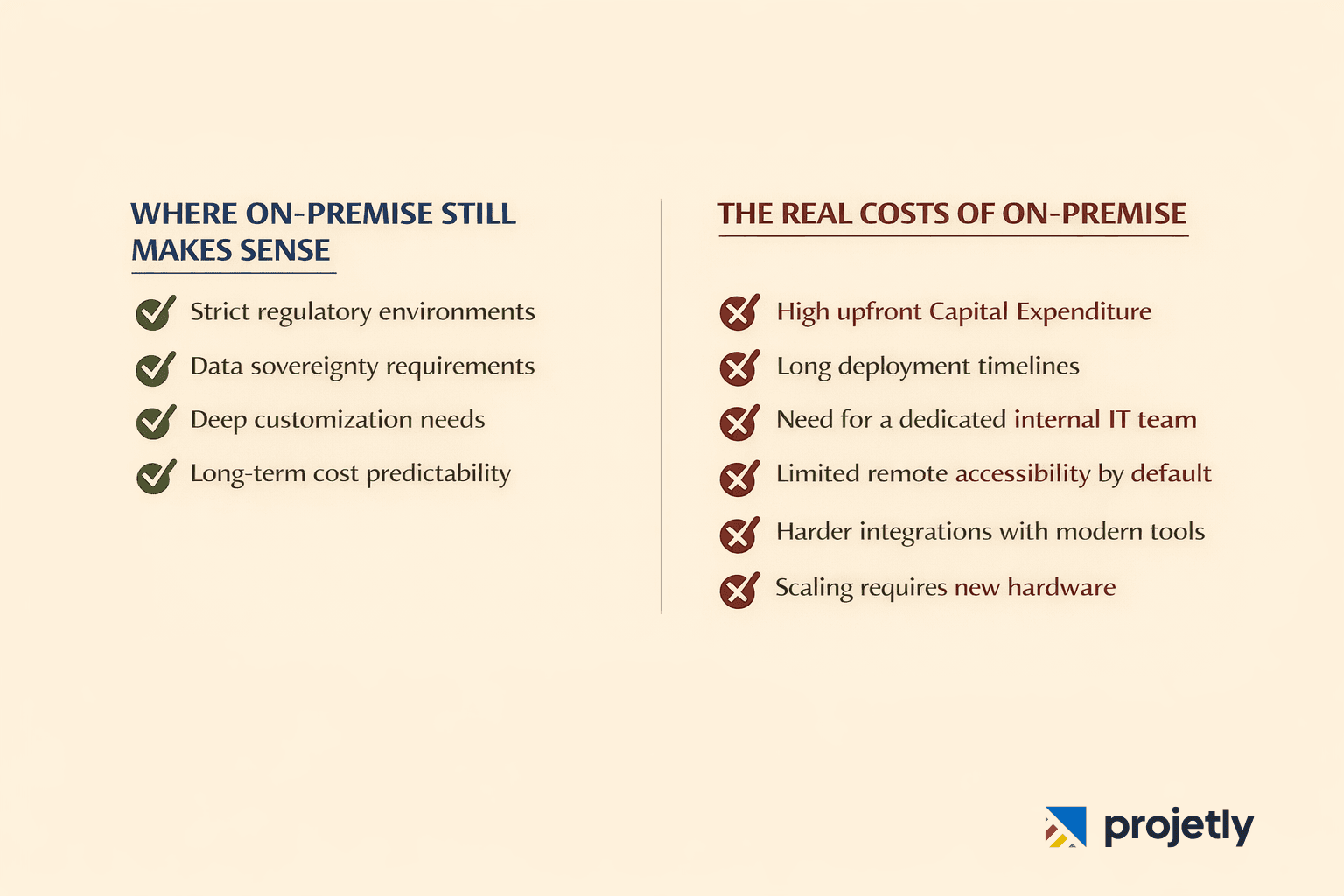
Where On-Premise Still Makes Sense
Strict regulatory environments: Firms operating under HIPAA, FINRA, FedRAMP, or government security classifications often have non-negotiable requirements for where data physically resides. On-premise puts that decision entirely in your hands.
Data sovereignty. If your clients or legal obligations require that sensitive project data never leave a specific jurisdiction or never leave your building on-premise is the clearest path to compliance.
Deep customization: Firms with highly specialized workflows, legacy ERP integrations, or proprietary processes can customize on-premise systems at the code level in ways cloud platforms typically don't permit.
Long-term cost predictability: After the initial capital investment, recurring costs are mainly IT staffing and hardware maintenance, with no per-user subscription ticking up as you hire.
The Real Costs of On-Premise
The advantages above come with significant trade-offs that are easy to underestimate during the selection process:
High upfront Capital Expenditure, like hardware, software licences, and implementation services, often running six figures or more for firms of 100+ people.
Deployment timelines are measured in months, not weeks, due to infrastructure procurement, configuration, and testing cycles.
A dedicated internal IT team to manage patches, backups, security monitoring, and system uptime. That's ongoing headcount cost, not a one-time spend.
Limited remote accessibility by default. Enabling remote access typically requires VPN configuration, which adds complexity and a potential security surface.
Integration with modern cloud tools (Slack, Salesforce, cloud accounting platforms) is harder and often requires custom middleware.
Scaling requires purchasing and provisioning new hardware, a weeks-long process that can bottleneck fast-growing teams.
On-premise or Cloud: which PSA model fits your firm best?
Talk to our experts and contact us today.
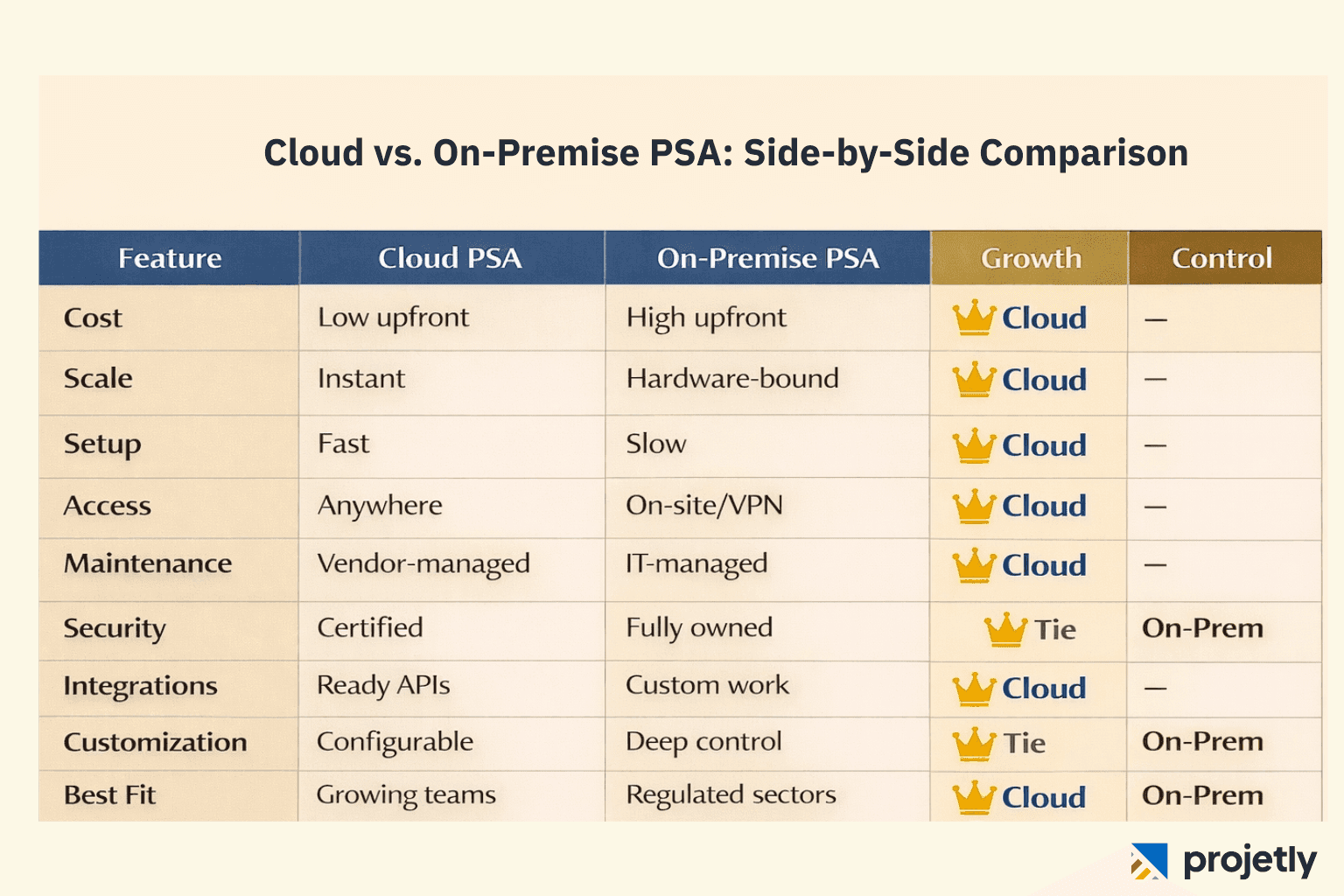
Cloud vs. On-Premise PSA: Side-by-Side Comparison
Use this table as a quick reference when evaluating options with your leadership team:
How to Choose the Right PSA Deployment Model for Your Firm
The right answer depends on four dimensions: your regulatory environment, your IT capacity, your growth trajectory, and your budget structure. Here's how to think through each.
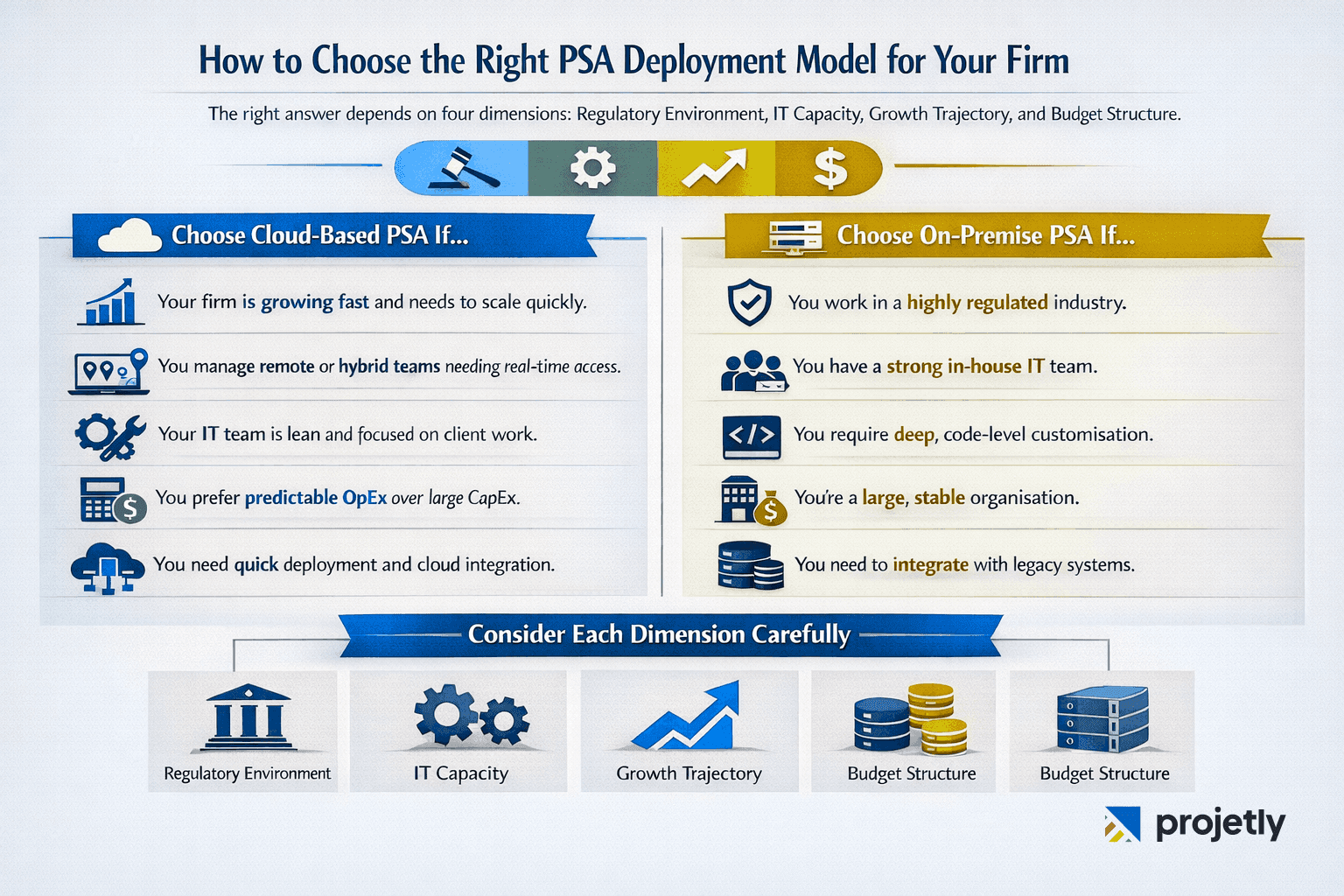
Choose Cloud-Based PSA If…
Your firm is growing fast and needs a system that can scale with headcount without infrastructure planning delays.
You manage remote or hybrid teams who need real-time access to project data, timesheets, and resource schedules from multiple locations.
Your IT team is lean, or you'd rather have them focused on client-facing work than managing server maintenance.
You want predictable operational expenses (OpEx) instead of large upfront capital commitments (CapEx).
You value time-to-value: getting a working system in weeks rather than months matters for your business.
Integration with your existing cloud tech stack (CRM, accounting, HRIS) is important.
Choose On-Premise PSA If…
You operate in a heavily regulated industry like healthcare, financial services, defence, government with strict requirements for data residency or security clearance.
You have an established, well-resourced internal IT team capable of managing ongoing maintenance and upgrades.
Your workflows are highly specialized and require code-level customization that cloud platforms can't accommodate.
You're a large, stable organization where the total cost of a long-term subscription would exceed the upfront cost of capital investment.
You have existing on-premise infrastructure or legacy ERP systems that need tight integration.
The Hybrid Middle Ground
An increasing number of firms are adopting hybrid PSA models, running core projects and resource data in the cloud while retaining sensitive financial or client data on‑premises. This approach is gaining traction as organizations balance scalability with compliance
Hybrid works best for firms in transition: moving away from a legacy on-premises system toward the cloud, but not ready to anaging two environments requires clear data governance, but the right PSA vendor can help architect a migration path that manages the risk.
What PSA Software Actually Solves: Common Challenges by Firm Type
SaaS Companies ($5M–$50M ARR)
Fast-growing SaaS firms typically face chaotic project workflows, unclear resource allocation, and billing errors that quietly erode margins. When engineers are stretched across product, implementation, and support work simultaneously, it's nearly impossible to get an accurate read on utilization or project profitability without a centralized platform.
PSA software brings visibility to who's working on what, automates timesheet capture, and produces accurate invoices, reducing revenue leakage that can otherwise represent 10–15% of billable output. For SaaS firms, cloud PSA software is almost always the right fit: low setup friction, API-first integrations, and the ability to scale user licences as headcount grows.
Consulting Firms (50–500 Employees)
Professional services firms live and die by utilization rates and billing accuracy. The difference between a 68% and a 75% utilization rate, across a 100-person firm, can represent millions in additional revenue annually without hiring a single new person.
PSA software closes that gap by matching consultants to projects based on skills and availability, flagging over- and under-allocated staff before it becomes a problem, and automating invoice generation so no hour goes unbilled. The right deployment model depends on the firm's regulatory context: a boutique strategy consultancy will likely thrive on cloud, while a healthcare advisory firm with HIPAA obligations may lean toward on-premises or a carefully architected hybrid.
PSA in 2026: AI, Automation, and What's Changed
The biggest shift in PSA software over the past two years isn't cloud adoption that was already well underway. It's the integration of AI-driven automation into core workflows that used to require manual judgment.
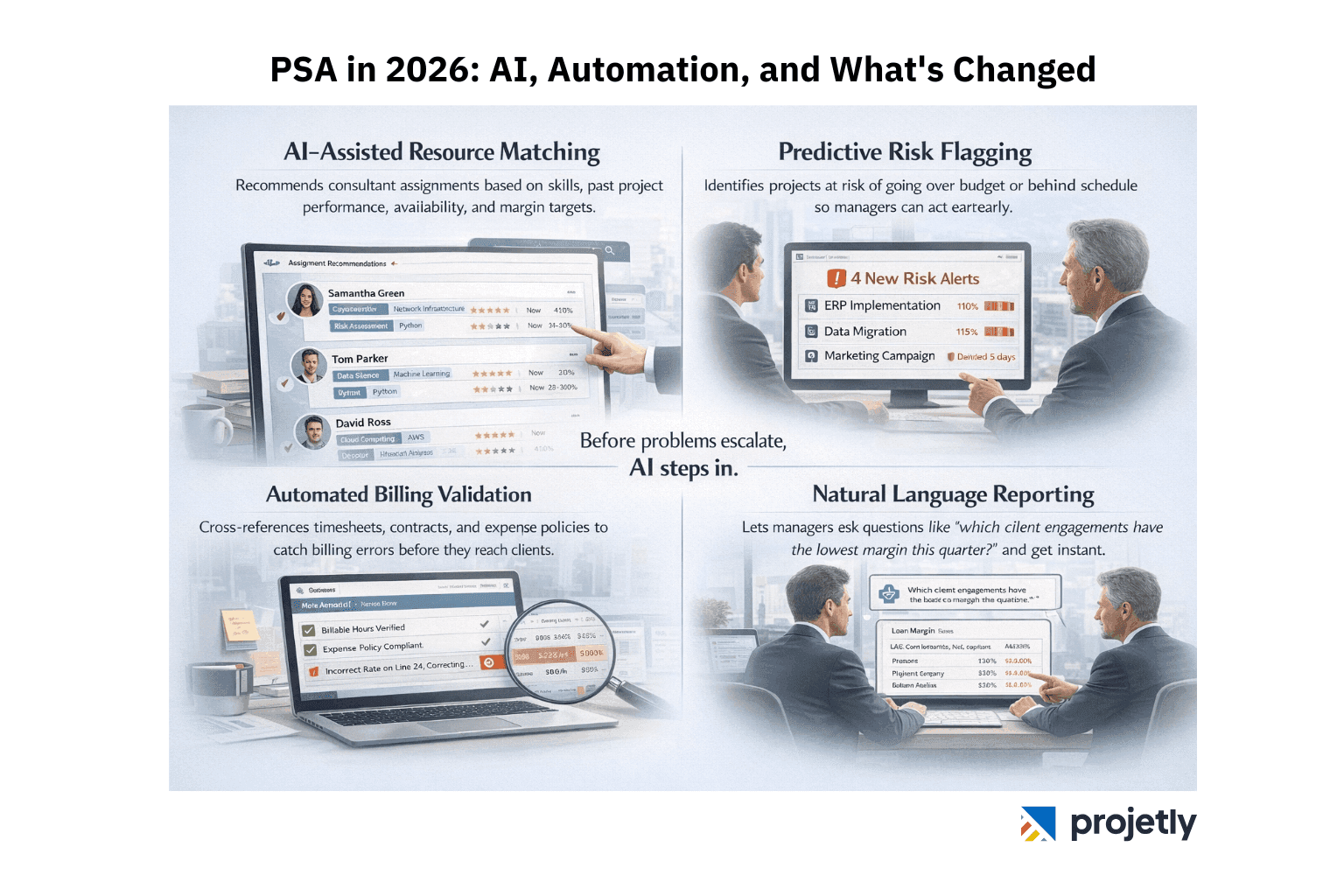
AI-assisted resource matching now recommends consultant assignments based on skills, past project performance, availability, and margin targets, not just a spreadsheet sort.
Predictive risk flagging identifies projects trending over budget or behind schedule before they miss a milestone, giving project managers time to intervene.
Automated billing validation cross-references timesheets, contract terms, and expense policies to catch errors before invoices reach clients.
Natural language reporting lets COOs and project managers ask questions like 'which client engagements have the lowest margin this quarter?' and get instant, data-backed answers.
These capabilities are almost exclusively available in cloud-based PSA platforms, Then, the update cadence required to keep AI models current doesn't translate well to annual on-premise release cycles. For firms choosing a PSA platform in 2026, the AI roadmap of potential vendors is worth scrutinizing.
Why Projetly is Built for This Moment
Projetly is a cloud-based PSA platform designed specifically for SaaS companies and professional services firms navigating the operational complexity that comes with growth. Rather than bolting project management features onto a CRM or trying to adapt a generic tool, Projetly was built from the ground up around the realities of billable teams.
What Projetly Brings Together
Firms using Projetly consistently report 15–20% improvements in billable utilization and a meaningful reduction in billing errors within the first two quarters. The platform scales without hardware costs and integrates natively with the cloud tools most growing firms already rely on.
Core PSA Features of Projetly
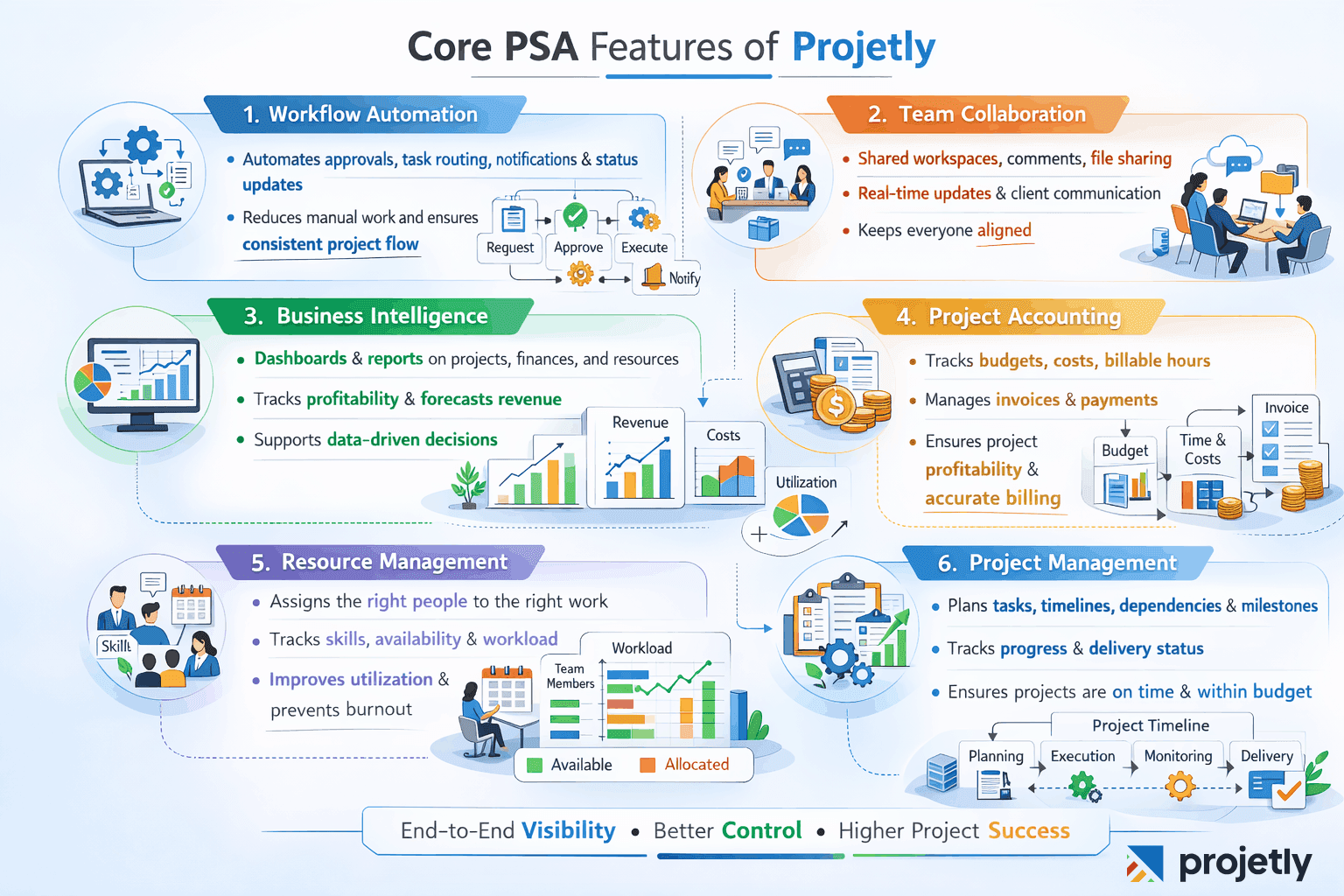
Workflow automation: Automates repeatable processes like approvals, task routing, notifications, and status updates, reducing manual work and keeping projects moving consistently.
Team collaboration: Provides shared workspaces, comments, file sharing, and real-time updates so teams, managers, and clients stay aligned without long email threads.
Business intelligence: Turns project, financial, and utilization data into dashboards and reports helpingg leaders track profitability, forecast revenue, and make better decisions.
Project accounting: Tracks budgets, costs, billable hours, and invoices at the project level, ensuring accurate billing and clear visibility into project profitability.
Resource management: Helps assign the right people to the right work based on skills, availability, and workload, preventing burnout and improving utilization.
Project management: Handles planning, timelines, dependencies, milestones, and progress tracking, giving teams structure and managers visibility into delivery status.
Want to see how Projetly can streamline your projects, teams, and billing?
Book a demo call today and explore it in action.
Frequently Asked Questions
What's the main difference between cloud-based and on-premise PSA software?
Cloud PSA is hosted and maintained by the vendor, accessed via the internet, and charged on a subscription basis. On-premise PSA is installed on your own servers, managed internally, and typically involves a larger upfront licence fee. The core functional difference is less about features than about who owns the infrastructure, who manages updates, and how you access the system.
Is cloud PSA software secure enough for sensitive client data?
For the vast majority of professional services firms, yes. Leading cloud PSA vendors maintain SOC 2 Type II, ISO 27001, and GDPR compliance, often with security postures that are harder to match on an internally managed system. US firms can typically opt for domestic data residency to satisfy data sovereignty requirements. If you're subject to specific regulatory frameworks like HIPAA or FINRA, verify the vendor's compliance certifications directly before committing.
How much does it cost to switch from on-premises to cloud PSA?
Migration costs vary based on data volume, integration complexity, and the vendor you're moving to, but the transition investment typically pays back within 12–18 months through reduced IT overhead and improved operational efficiency. Cloud platforms also shift the cost from capital expenditure to operational expenditure, which many CFOs prefer from a balance sheet perspective.
What happens to our data if we switch cloud PSA vendors?
Reputable vendors provide data export tools and will work with you during an offboarding process to ensure you can extract your project history, billing records, and resource data in standard formats. Always confirm data portability terms before signing a multi-year contract.
When does a hybrid PSA model make sense?
A hybrid approach works well for firms with mixed requirements: teams that need cloud flexibility for day-to-day project work, but compliance obligations that require certain datafinancial records, client contracts, and personally identifiable information, to remain on local infrastructure. It's also a common transitional architecture for firms moving off legacy on-premise systems gradually rather than in a single cutover.
How does AI improve PSA software in 2026?
AI in modern PSA platforms goes well beyond chatbots. Practical applications include automated resource matching based on skills and availability, predictive project risk alerts before milestones slip, invoice validation that catches billing errors pre-submission, and natural language analytics that let non-technical leaders query project data in plain English. These capabilities are most mature in cloud-native platforms that can update their models continuously.
Can PSA software support fully remote or globally distributed teams?
Cloud PSA software is essentially built for distributed teams, mobile access, real-time data sync, shared project dashboards, and client portals to work regardless of where your team is located. On-premises systems can support remote access but typically require VPN configuration and have less seamless mobile experiences by default.
You may also like

A Guide to Project Management Professional Certification

Laugh Your Way to Productivity: 50 Workplace Quotes

50 Funny Workplace Memes That’ll Brighten Your Workday.
What Does a Customer-First Mindset Mean? Explained in 2025

What It Takes to be a Great Customer Success Manager in 2025